


Choosing the right hosting for your website can feel overwhelming. You’ve probably heard about cloud hosting and shared hosting, but which one truly fits your needs?
Imagine your website as a busy shop—do you want to share a small space with dozens of other stores, or have access to a flexible, expansive building that grows with your business? Your website’s speed, reliability, and ability to handle visitors all depend on this choice.
You’ll discover the key differences between cloud hosting and shared hosting, helping you pick the perfect option to keep your site running smoothly and your visitors happy. Keep reading to find out which hosting type matches your goals and budget best.
Shared Hosting Basics
Understanding the basics of shared hosting is essential before deciding if it fits your website’s needs. Shared hosting is often the first step for many website owners because it offers an affordable and straightforward way to get online. However, knowing how it works and what to expect can save you from surprises down the road.
How Shared Hosting Works
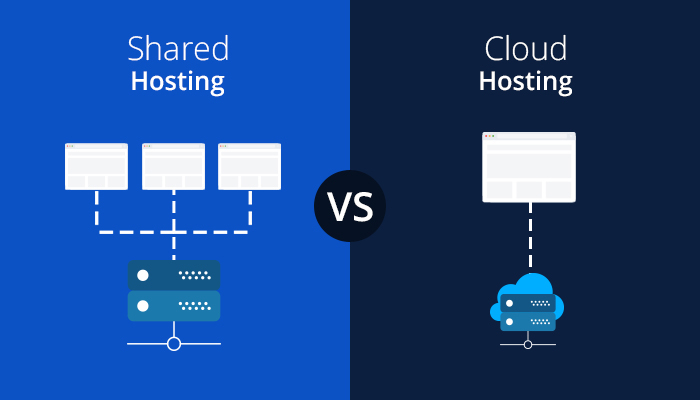
In shared hosting, multiple websites live on one physical server. They all share the server’s resources like CPU, RAM, and storage space.
This setup keeps costs low because the server expenses are divided among many users. But it also means your site’s performance can be affected by other sites on the same server if they use a lot of resources.
Common Features
- Cost-Effective: Shared hosting plans usually come at a low monthly price, making them budget-friendly.
- Managed Environment: The hosting provider handles server maintenance, security, and updates, so you don’t have to.
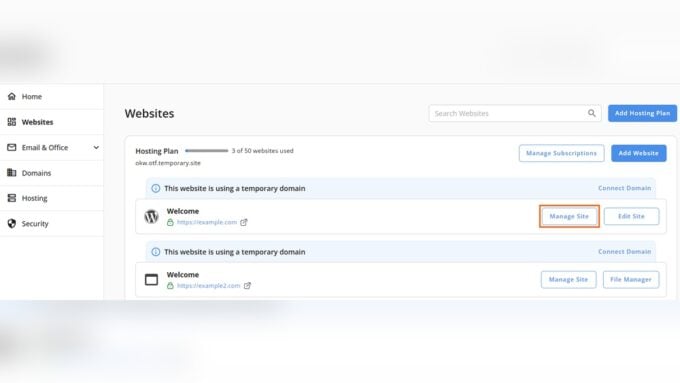
- Limited Control: You get access to basic tools like cPanel, but no root access to customize server settings.
- Resource Limits: You share bandwidth and disk space with other users, which can restrict website growth.
- Pre-Installed Software: Popular applications like WordPress are easy to install with one-click installers.
Ideal Use Cases
Shared hosting is perfect if you’re starting a small blog, portfolio, or a simple business website with low traffic. It’s also a good choice if you want to keep costs down while learning the basics of website management.
But what happens if your site suddenly gains popularity? Shared hosting might struggle to keep up, causing slow load times or downtime. Have you considered whether your website’s growth plans match the limitations of shared hosting?
When I launched my first blog, shared hosting was the easiest way to get started. It handled the traffic well until I hit a few thousand visitors a month, then I had to upgrade. Knowing this upfront helped me plan better and avoid unexpected downtime.
Cloud Hosting Basics
Cloud hosting is a modern way to host websites and applications. It uses many connected servers instead of just one. This setup offers more power and flexibility than traditional hosting.
Understanding cloud hosting helps you decide if it fits your needs. It works differently than shared hosting, which places many websites on a single server. Cloud hosting spreads your site across many servers.
How Cloud Hosting Works
Cloud hosting uses a network of virtual servers. These servers work together to handle your website’s data and traffic. If one server fails, others take over to keep your site running.
Resources like CPU, memory, and storage come from this server cluster. This means your website can use more power when needed. It also means your site won’t slow down if traffic spikes.
Key Features
Cloud hosting offers scalability, so you pay only for what you use. It provides high uptime because multiple servers support your site. Security is stronger since data is backed up across several servers.
Users get more control over settings and software. Cloud hosting often includes easy management tools. These features make it suitable for different website types and sizes.
Ideal Use Cases
Cloud hosting suits websites that grow fast or have unpredictable traffic. Online stores, apps, and business sites benefit from its reliability and speed. It also works well for sites needing strong security and data backups.
It is less ideal for small, simple websites with low traffic. Those sites might not need the extra power or cost of cloud hosting. Still, cloud hosting supports many website needs with flexibility.
Performance Comparison
Performance is a key factor when choosing between cloud hosting and shared hosting. It affects user experience, search rankings, and site success. Understanding how each hosting type performs helps you pick the right option for your site’s needs.
This section compares cloud hosting and shared hosting on speed, reliability, handling traffic spikes, uptime, and downtime.
Speed And Reliability
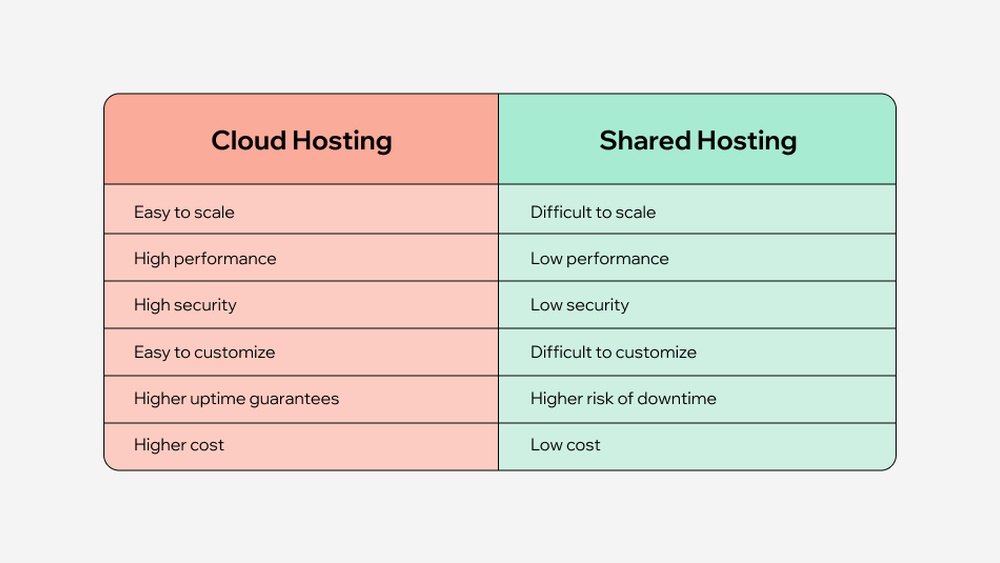
Cloud hosting uses multiple servers working together to deliver content fast. This spreads the load and reduces delays. Shared hosting places many websites on one server. If one site uses too many resources, others slow down.
Cloud hosting’s design makes it more reliable. Shared hosting speed depends on other sites’ traffic and activities. Cloud hosting offers steady performance even during busy times.
Handling Traffic Spikes
Cloud hosting can easily handle sudden traffic increases. It scales resources up or down automatically. This keeps your site running smoothly during spikes.
Shared hosting has fixed resources. If traffic spikes, the server can become overloaded. This causes slow loading or crashes. Shared hosting is less flexible to sudden changes in traffic.
Uptime And Downtime
Cloud hosting provides high uptime. Its network of servers means if one fails, others take over. This reduces downtime and keeps your site live.
Shared hosting depends on a single server. If it goes down, all sites on it go offline. This can lead to longer downtime and lost visitors.

Credit: www.cloudpanel.io
Scalability And Flexibility
Scalability and flexibility are key factors in choosing between cloud hosting and shared hosting. These aspects determine how well your website can handle growth and changing needs. Cloud hosting generally offers more options for expanding resources and adapting settings. Shared hosting, on the other hand, has limits due to its fixed server environment. Understanding these differences helps in selecting the right hosting type for your website’s future.
Resource Allocation
Shared hosting divides server resources among many websites. CPU, memory, and storage are shared and fixed. This can lead to slowdowns if other sites use too much power. Cloud hosting uses virtual servers that pull resources from multiple machines. This setup allows your website to get more CPU and memory as needed. Resource allocation in cloud hosting is dynamic and efficient.
Scaling Options
Scaling in shared hosting is limited to small upgrades or moving to a higher plan. The server’s capacity caps growth. Cloud hosting supports automatic scaling, adding more resources during traffic spikes. It can handle sudden increases without downtime. Users can scale up or down easily, paying only for what they use. This flexibility makes cloud hosting suitable for growing websites.
Customization Capabilities
Shared hosting offers minimal customization. Users cannot change server settings or install custom software. This restricts performance tuning and security adjustments. Cloud hosting provides root access and control over configurations. Users can install specific software and optimize settings to fit their needs. This level of customization supports advanced applications and unique website requirements.
Cost Analysis
Cost is a key factor when choosing between cloud hosting and shared hosting. Understanding the expenses helps you pick the best option for your website. This section breaks down the pricing models, value for money, and long-term costs of both hosting types.
Pricing Models
Shared hosting usually charges a fixed monthly fee. This fee covers a set amount of server resources shared with other users. Cloud hosting often uses a pay-as-you-go model. You pay for the exact resources your site uses. This model can save money if your traffic varies a lot. But it might cost more if your site needs constant high resources.
Value For Money
Shared hosting offers low upfront costs. It suits small sites with steady, low traffic. Cloud hosting provides better performance and flexibility. It handles traffic spikes without slowing down. The extra cost may be worth it for growing websites. You get more control and faster load times. This can improve user experience and search rankings.
Long-term Expenses
Shared hosting plans may seem cheap at first. But they limit your site’s growth and speed. Upgrading to higher plans or moving to cloud hosting can be costly later. Cloud hosting scales with your needs. You pay more only as your traffic grows. This makes cloud hosting more cost-effective over time for busy sites.
Security Considerations
Security is a key factor when choosing between cloud hosting and shared hosting. It affects your website’s safety and reliability. Understanding the risks and protections helps make the best decision for your needs.
Shared Hosting Risks
Shared hosting means many websites share one server. This setup can lead to security problems. If one site gets hacked, others may be at risk. Server resources are limited and may expose vulnerabilities. Users have little control over security settings. Malware or viruses can spread easily between sites.
Cloud Hosting Security Features
Cloud hosting offers stronger security compared to shared hosting. It uses multiple servers to protect data. If one server fails, others keep your site running safely. Firewalls and encryption protect against unauthorized access. Users often get better control over security options. Regular updates help defend against new threats.
Backup And Recovery
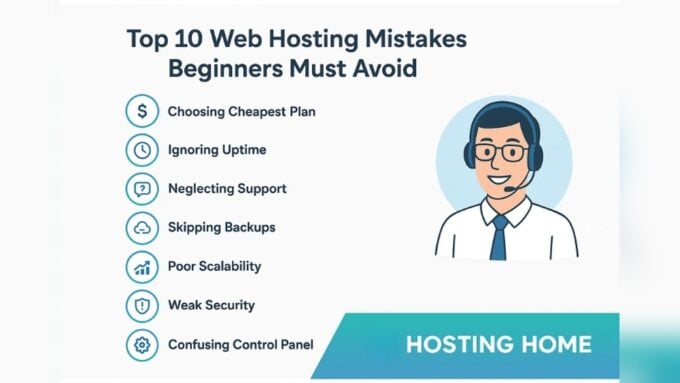
Backups are vital for any hosting type. Shared hosting usually offers limited backup options. Cloud hosting provides automated backups frequently. This helps restore your site quickly after data loss. Recovery tools in cloud hosting reduce downtime and data risk. Always check backup policies before choosing a host.
Technical Requirements
Understanding the technical requirements of cloud hosting and shared hosting helps you choose the right solution. Both hosting types have different demands in terms of management, expertise, and support. These factors affect your website’s performance and ease of use.
Management And Setup
Shared hosting has a simple setup process. Hosting providers handle most technical tasks. You only need to upload your website files. Cloud hosting requires more steps to configure. You may need to manage multiple servers and resources. This setup offers more control but demands more involvement.
Required Expertise
Shared hosting suits beginners with limited technical skills. The provider manages server maintenance and security. Cloud hosting requires advanced knowledge. You must understand server management and network configurations. This expertise helps optimize your website’s speed and reliability.
Available Support
Shared hosting plans often include 24/7 basic customer support. Support teams assist with common issues and questions. Cloud hosting may offer tiered support options. Higher-level plans provide dedicated technical help. This support is crucial for managing complex server environments.
Popular Providers
Choosing between cloud hosting and shared hosting involves understanding the providers behind each option. Popular providers offer different features, prices, and performance levels. Knowing these can help you select the best fit for your website’s needs. Below, we explore common providers in both categories and their managed services.
Shared Hosting Options
Shared hosting providers include Bluehost, HostGator, and SiteGround. These companies offer affordable plans for small websites and beginners. They manage server maintenance, security, and backups. Shared hosting is simple and requires little technical skill. It works well for blogs and small business sites with low traffic.
Cloud Hosting Platforms
Cloud hosting platforms like Amazon Web Services (AWS), Google Cloud, and Microsoft Azure provide scalable solutions. They use multiple servers to deliver high uptime and fast loading speeds. These platforms suit growing websites that need flexibility and power. Cloud hosting can handle traffic spikes without slowing down your site.
Managed Services
Many providers offer managed services to handle technical tasks. Managed shared hosting includes updates, security scans, and support. Managed cloud hosting goes further with automatic scaling and load balancing. Companies like WP Engine and Kinsta specialize in managed hosting. These services reduce your workload and improve website performance.
Choosing The Right Hosting
Choosing the right hosting service is essential for your website’s success. The decision affects your site’s speed, security, and ability to grow. It also impacts your budget and technical needs. Understanding the differences between cloud hosting and shared hosting helps you make the best choice.
Factors To Consider
Start by evaluating your website’s traffic and resource needs. Shared hosting works well for small sites with low traffic. It offers limited control and fewer resources. Cloud hosting suits sites with higher traffic and variable demands. It provides more control and flexibility. Also, consider your budget. Shared hosting is usually cheaper. Cloud hosting costs more but offers better performance and scalability.
Business Growth Impact
Your hosting choice affects how your business grows online. Shared hosting may slow down as traffic increases. This can frustrate visitors and hurt sales. Cloud hosting adapts to traffic spikes easily. It keeps your site fast and reliable. Growing businesses benefit from cloud hosting’s scalability. It supports more visitors without downtime or delays.
Future-proofing Your Website
Think about your website’s future needs. Shared hosting has limits on storage and bandwidth. It may not support new features or higher traffic later. Cloud hosting allows you to add resources quickly. It can handle larger files, more users, and advanced applications. Choosing cloud hosting now can save time and money later. It prepares your site for growth and changes.

Credit: www.hostgator.com
Credit: www.cloudways.com
How Our Company Can Help You with Cloud Hosting Vs Shared Hosting
Practical Learning with Cloud Hosting vs Shared Hosting
Understanding the differences between cloud hosting and shared hosting opens up valuable learning opportunities, especially when considering performance, scalability, and cost analysis. For beginners and businesses alike, experimenting with a shared hosting plan can provide hands-on experience with basic website management and resource limitations. This practical exposure helps clarify how shared environments impact performance during traffic spikes.
On the other hand, exploring cloud hosting introduces flexibility and scalability concepts, allowing users to grasp how dynamic resource allocation works in real time. This knowledge is particularly useful for developers and growing businesses aiming to optimize technical requirements while balancing budget considerations.
- Try setting up a small website on shared hosting to observe resource sharing in action.
- Experiment with cloud hosting’s scalability features to understand how it adjusts to increased demand.
- Compare security settings in both environments to appreciate their differences firsthand.
For those seeking guidance, resources like HostingAdvise offer evidence-based reviews and detailed comparisons grounded in official documentation and verified user feedback. If you have questions or want to dive deeper into specific hosting needs, reaching out to their support can provide informed, balanced advice without any sales pressure.
Frequently Asked Questions
What Are The 4 Types Of Hosting?
The four types of hosting are shared, VPS (Virtual Private Server), dedicated, and cloud hosting. Each offers different performance, control, and pricing levels.
What Are The Disadvantages Of Shared Hosting?
Shared hosting limits control and customization since you lack root access. Performance may suffer due to traffic spikes on other sites sharing the server. Security risks increase because resources are shared. It offers less reliability and slower load times compared to dedicated or cloud hosting.
What Is The Difference Between Hosting And Cloud Hosting?
Hosting stores your website on a single physical server with shared resources. Cloud hosting uses multiple virtual servers, offering better scalability, reliability, and performance. Cloud hosting adapts to traffic spikes automatically, while traditional hosting has fixed resources and limited flexibility.
When Should I Use Shared Hosting?
Use shared hosting for small websites or blogs with low traffic and minimal resource needs. It’s cost-effective and beginner-friendly.
Conclusion
Choosing between cloud hosting and shared hosting depends on your website needs. Shared hosting suits small sites with low traffic and limited budgets. It offers simplicity but shares resources with many others. Cloud hosting provides better speed, flexibility, and uptime by using multiple servers.
It fits growing sites needing more power and reliability. Think about your current traffic, budget, and plans for growth. This helps pick the best hosting type for your website’s success. Simple and clear choices lead to smoother online experiences.











Leave a comment