


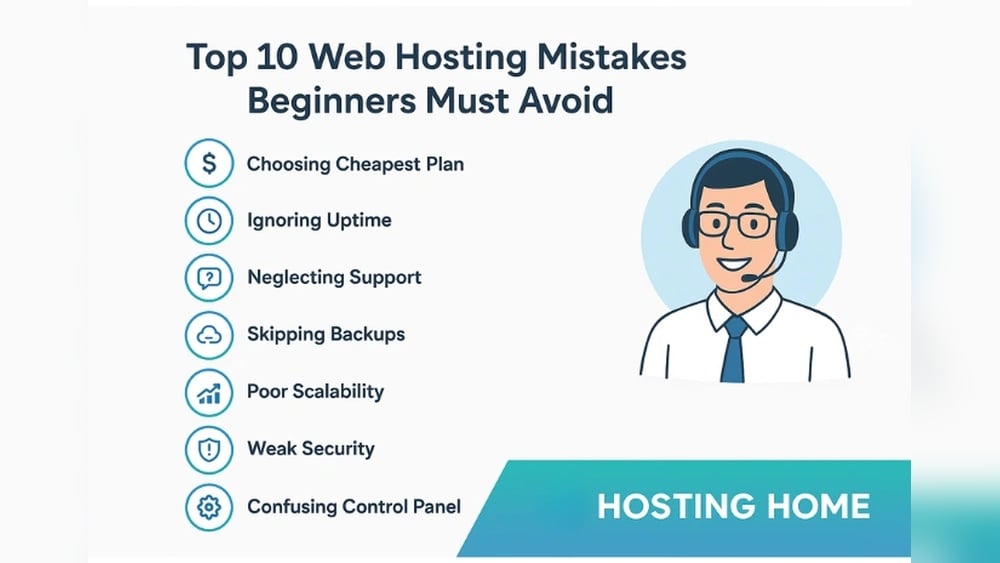
You’ve worked hard to build your website, but one wrong move with your web hosting can cost you clients and money without you even realizing it. Are you sure you’re not making simple hosting mistakes that slow down your site, cause frequent downtime, or leave your data vulnerable?
If your visitors get frustrated waiting for pages to load or can’t access your site at all, they’ll go straight to your competitors. Don’t let avoidable errors hold your online presence back. You’ll discover the most common web hosting mistakes and how to steer clear of them—so your site runs smoothly, stays secure, and keeps your visitors coming back.
Keep reading to protect your investment and get the most out of your hosting plan.
Choosing The Wrong Hosting Type
Choosing the wrong hosting type can harm your website’s performance and user experience. Many people pick a hosting plan without knowing what fits their site best. This mistake can slow down your site, cause downtime, or limit growth. Understanding different hosting options is key to making the right choice.
Shared Vs Dedicated Hosting
Shared hosting means many websites share the same server. It is cheaper but slower. Resources like CPU and memory are split among users. This can cause delays if other sites use too much power.
Dedicated hosting gives you a whole server. You get full control and better speed. It is more expensive but suits large or busy websites. Dedicated hosting offers improved security and reliability.
Cloud Hosting Benefits
Cloud hosting uses multiple servers to host your site. It spreads traffic across many machines. This stops your site from crashing during traffic spikes. Cloud hosting is flexible and often costs less than dedicated servers.
It allows quick updates and easy backups. Many providers offer pay-as-you-go plans. This means you only pay for what you use. Cloud hosting is great for growing sites or businesses.
Considering Scalability
Scalability means your site can grow without problems. Choose hosting that lets you add resources fast. Avoid plans that limit your bandwidth or storage. Your website may slow down or go offline without enough space.
Scalable hosting supports traffic growth and new features. It prevents costly moves to new hosts later. Think about future needs, not just current ones. This saves time and money over time.

Credit: digitalspace.net
Overpaying For Hosting Plans
Paying too much for web hosting is a frequent error. Many choose plans with features they do not need. This wastes money and can slow down your site. Careful selection helps you avoid overspending. Focus on what you really need for your website.
Assessing Your Actual Needs
Start by listing your website’s key needs. Consider traffic, storage, and security. Small blogs need less space and bandwidth. E-commerce sites require more power and backups. Avoid guessing; check your current usage. Match the plan to your real requirements.
Avoiding Unnecessary Features
Hosting providers add extras to attract buyers. Many include features you will never use. These can raise the monthly cost significantly. Look out for automatic add-ons at checkout. Disable anything that does not benefit your site. Keep your plan simple and cost-effective.
Comparing Plan Costs
Compare prices across different hosting companies. Look beyond the headline price. Check renewal rates and hidden fees. Factor in customer support and uptime guarantees. A cheaper plan may cost more later. Choose a plan that balances price with quality.
Ignoring Website Performance
Ignoring website performance can harm your online presence. Visitors expect fast and smooth experiences. Slow sites frustrate users and increase bounce rates. Poor performance can lower search engine rankings. Focus on improving site speed and usability. Small changes can make a big difference in keeping visitors engaged.
Optimizing Page Speed
Page speed affects user satisfaction and search rankings. Compress images and reduce file sizes. Use caching to load pages faster. Minimize the use of heavy scripts and plugins. Choose a reliable hosting provider with fast servers. Test your website speed regularly and fix issues quickly.
Reducing Clutter
Cluttered pages confuse visitors and slow down loading times. Keep your design simple and clear. Limit the number of ads and pop-ups. Use whitespace to create a clean layout. Organize content for easy reading and navigation. A tidy website improves both speed and user experience.
Mobile-friendly Design
Many users access websites on mobile devices. A mobile-friendly design adapts to smaller screens. Use responsive themes that resize content automatically. Ensure buttons and links are easy to tap. Test your site on different devices to check usability. Mobile optimization boosts engagement and search rankings.
Neglecting Security Measures
Neglecting security measures is a critical mistake in web hosting. Without proper protection, websites face risks like data theft, hacking, and downtime. These issues damage reputation and lose visitors. Securing your site builds trust and keeps it running smoothly.
Using Ssl Certificates
SSL certificates encrypt data between visitors and your website. This protection stops hackers from stealing information. Many browsers mark sites without SSL as unsafe. Installing an SSL certificate boosts security and improves search engine ranking.
Regular Software Updates
Websites use software like content management systems and plugins. These tools often have security patches in updates. Ignoring updates leaves your site open to attacks. Schedule regular updates to fix vulnerabilities and keep your site safe.
Protecting Against Malware
Malware can harm your website and visitors. It may steal data or slow down your server. Use malware scanning and removal tools to detect threats early. Strong passwords and firewalls also help block malicious attacks.
Skipping Regular Backups
Skipping regular backups is a costly mistake in web hosting. Data loss can happen anytime due to hacks, server failures, or human errors. Without backups, recovery becomes difficult or impossible. Regular backups protect your website’s content and user data. They ensure business continuity and reduce downtime.
Automated Backup Solutions
Automated backups save time and reduce human errors. Many hosting providers offer built-in automatic backup features. You can schedule backups daily, weekly, or monthly. These systems run in the background without interrupting your work. Using automated solutions ensures your data is always backed up on time.
Backup Frequency Recommendations
Backup frequency depends on how often your website updates. For blogs or static sites, weekly backups may suffice. For e-commerce or active sites, daily backups are better. Always keep multiple backup copies from different dates. This helps restore your site to the most recent stable version.
Restoring From Backups
Backing up is useless if you cannot restore data quickly. Test your backups regularly to ensure they work. Know the steps to restore your website from backup files. Most hosting providers offer one-click restore options. Quick restoration minimizes downtime and loss of visitors.

Credit: www.dewlance.com
Choosing Unreliable Providers
Choosing an unreliable web hosting provider can cause many problems for your website. It may lead to frequent downtime, slow loading speeds, and weak security. These issues can hurt your site’s reputation and lose visitors. Selecting a dependable host is vital for smooth website operation and growth.
Checking Uptime Guarantees
Uptime guarantees show how often a host promises your website will be online. Look for providers offering at least 99.9% uptime. Lower guarantees often mean more downtime, which can frustrate visitors and reduce sales. Check if the host compensates you when uptime falls below their promise.
Evaluating Customer Support
Good customer support helps solve issues quickly. Choose hosts with 24/7 support via chat, phone, or email. Test their response times before buying. Slow or unhelpful support can delay problem fixes, causing more downtime and lost customers. Reliable support keeps your website running smoothly.
Reading User Reviews
User reviews reveal real experiences with a hosting company. Read multiple reviews on trusted sites. Pay attention to complaints about downtime, speed, or support. Look for patterns instead of single bad comments. Honest reviews help you avoid hosts with poor performance or bad service.
Forgetting Domain Management
Forgetting domain management can cause major problems for your website. Your domain is your site’s address on the internet. If you neglect it, visitors may not find you. Your website might even go offline. Managing your domain carefully keeps your site live and secure. It also protects your brand and your visitors.
Renewal Reminders
Missing your domain renewal date can make your website disappear. Domains expire if you don’t renew them on time. Set up automatic renewal or calendar reminders. Check your email regularly for renewal notices. Act fast to avoid losing your domain to others.
Domain Privacy Options
Domain privacy hides your personal information from public view. Without it, your name and contact details show in the WHOIS database. This can lead to spam and unwanted contacts. Enable domain privacy to protect your data. It keeps you safe and your inbox clean.
Proper Dns Configuration
DNS settings link your domain to your website. Incorrect DNS causes your site to load slowly or not at all. Confirm your DNS records are accurate after any hosting change. Use your hosting provider’s tools to check your DNS. Proper setup ensures visitors reach your site without issues.
Overlooking Cms And Plugin Updates
Overlooking updates for your CMS and plugins is a common mistake in web hosting. These updates are crucial for keeping your website running smoothly and securely. Ignoring them can cause problems that affect your site’s performance and safety.
Maintaining WordPress Updates
WordPress regularly releases updates to fix bugs and improve features. Skipping these updates can slow your site or cause errors. Always install the latest WordPress version. This keeps your site fast and compatible with new tools.
Managing Plugin Compatibility
Plugins add features to your website but can conflict with each other. Outdated plugins may not work with the newest WordPress version. This can break your site or cause errors. Check plugin updates often. Remove plugins you no longer use to reduce risks.
Preventing Security Vulnerabilities
Old CMS and plugin versions have security holes. Hackers exploit these to access your site or data. Regular updates fix these weaknesses. They protect your site from attacks and malware. Stay safe by updating immediately after new releases.
Failing To Monitor Website Data
Failing to monitor website data is a critical error that can hurt your site’s performance. Without tracking key metrics, you miss signs of problems or chances to improve. Website data reveals how visitors interact with your content and how your hosting handles traffic.
Ignoring these insights leads to poor user experience and wasted resources. Monitoring website data helps you keep your site fast, reliable, and user-friendly. It also guides smart decisions about your hosting needs and website growth.
Using Analytics Tools
Analytics tools collect data about your website visitors. They show how many people visit and which pages they like most. These tools help spot trends and find weak spots on your site. Google Analytics is a popular, free option that is easy to set up. Using analytics tools gives you a clear picture of your site’s health and user interest.
Tracking User Behavior
User behavior tracking shows what visitors do on your site. It reveals how long they stay, what they click, and where they leave. This information helps understand visitor needs and frustrations. By analyzing user behavior, you can improve site design and content. Tracking user behavior leads to a better user experience and higher engagement.
Adjusting Hosting Based On Traffic
Website traffic changes over time. Your hosting plan must match these changes to keep your site running smoothly. Monitoring traffic helps decide when to upgrade or scale hosting resources. If traffic spikes, more bandwidth and faster servers may be needed. Adjusting hosting based on traffic prevents slowdowns and downtime, keeping visitors happy.

Credit: ultahost.com
How Our Company Can Help You with Web Hosting Mistakes to Avoid
Turning Hosting Mistakes into Learning Opportunities
Understanding common pitfalls like choosing the wrong hosting type or neglecting website performance offers valuable lessons for managing your online presence effectively. For instance, selecting a hosting plan that aligns with your site’s traffic and growth expectations is crucial. This avoids overspending while ensuring scalability. Similarly, monitoring website speed and uptime isn’t just about avoiding downtime; it’s an ongoing practice that sharpens your ability to maintain a smooth user experience.
At HostingAdvise, our approach combines insights from official documentation, independent research, and user feedback, helping beginners and developers alike to build confidence in their hosting choices. By regularly updating your CMS and plugins, and performing backups, you not only protect your site but also deepen your technical know-how.
- Review your hosting needs periodically to avoid overpaying.
- Stay vigilant about security and performance metrics.
- Use reliable resources to stay informed about best practices.
If questions arise, reaching out to knowledgeable communities or support channels can provide clarity without pressure. This practical mindset transforms common web hosting mistakes into stepping stones toward a stronger online foundation.
Frequently Asked Questions
What Are The Most Common Web Hosting Mistakes?
Common mistakes include choosing the wrong hosting type, ignoring scalability, and overpaying for plans. Avoid cluttered, non-mobile-friendly websites and neglecting page speed optimization. Regular backups and security updates are essential to prevent data loss and downtime.
How Does Choosing The Wrong Hosting Affect My Website?
Selecting an unsuitable hosting plan leads to slow loading, frequent downtime, and poor user experience. It limits your website’s growth and scalability. Always pick a hosting type that matches your site’s traffic and technical needs for optimal performance.
Why Is Mobile-friendly Hosting Important?
Most users access websites via mobile devices. A non-mobile-friendly site can drive visitors away and harm SEO rankings. Ensure your hosting provider supports responsive design and fast mobile load times to improve engagement and search visibility.
How Can I Avoid Overpaying For Web Hosting?
Compare plans carefully and assess your website’s actual needs before purchasing. Avoid unnecessary add-ons or premium features you don’t require. Look for transparent pricing and scalable options that allow you to upgrade as your site grows.
Conclusion
Avoiding common web hosting mistakes saves time and money. Choose plans that fit your site’s needs. Keep your website fast and mobile-friendly. Regular backups protect your content from loss. Check your hosting provider’s reliability often. Small changes can improve your site’s performance.
Stay aware and update your hosting knowledge. This helps keep your website secure and smooth. Simple steps create a better experience for visitors. Good hosting decisions build a stronger online presence.











Leave a comment