


Thinking about moving your domain to a new registrar but not sure where to start? Transferring a domain might sound complicated, but it doesn’t have to be.
Whether you want better pricing, improved service, or more control, switching your domain registrar can give you exactly what you need. In this guide, you’ll discover simple, clear steps to transfer your domain smoothly and securely, without losing any important settings or downtime.
Keep reading, and you’ll gain the confidence to handle the entire process yourself—quickly and hassle-free. Your domain is your online identity, so make sure it’s in the right hands. Let’s get started!

Credit: chemicloud.com
Prepare Your Domain
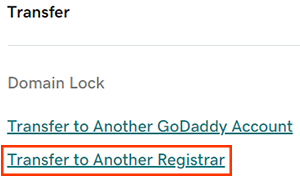
To transfer a domain, first unlock it at your current registrar. This means turning off any locks that stop the domain from moving. Then, disable privacy protection so the new registrar can see your contact details. Next, backup your DNS records. These records tell the internet where your website and emails are hosted. Saving them helps avoid problems after the transfer.
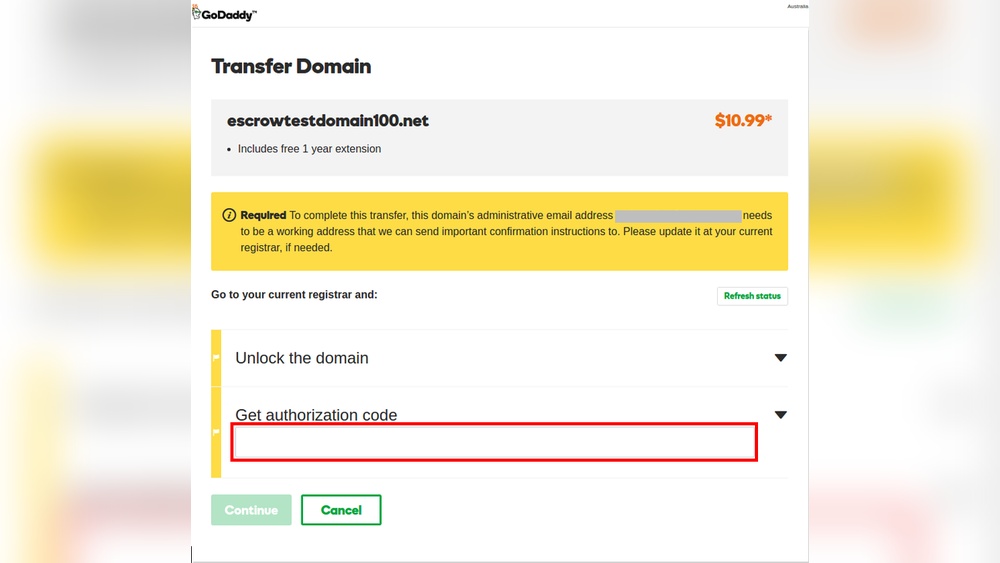
After unlocking the domain, request the authorization code, also called the EPP code. This code is needed to approve the transfer. It usually arrives by email to the domain owner.
| Step | Action |
|---|---|
| 1 | Log in to your current registrar account |
| 2 | Find your domain settings and turn off the lock |
| 3 | Disable privacy protection for your domain |
| 4 | Backup DNS records (website, email settings) |
| 5 | Request the authorization (EPP) code via email |
Obtain Authorization Code
Requesting the EPP Code is a key step in transferring your domain. This code acts like a password for the transfer process. It is usually sent to the administrative email address linked to your domain. Check this email carefully, as it contains the code needed to move your domain to a new registrar.
Ensure your domain is unlocked before requesting the code. Locked domains cannot be transferred. Also, make sure your administrative email is current and accessible. Without access, receiving the EPP code will be impossible, delaying the transfer.
Set Up New Registrar Account
Choosing the right registrar is key for a smooth domain transfer. Compare prices, features, and support. Look for registrars with easy-to-use interfaces and good customer service.
Next, create your account on the new registrar’s website. Provide accurate contact details to avoid issues. Use a strong password to keep your account safe.
Once your account is ready, you can start the domain transfer process. The new registrar will guide you through the necessary steps.
Initiate Domain Transfer
Start by unlocking your domain at the current registrar. This step allows the domain to be transferred.
Next, request the authorization code. It is also called an EPP code. This code is sent to the domain owner’s email.
Use the authorization code to confirm the transfer request with the new registrar. This tells them to start the transfer.
Make sure your contact details are up to date. The new registrar may send a confirmation email to you.
Remember, the transfer process may take a few days to complete.
Wait For Transfer Completion
Domain transfers usually take 5 to 7 days to finish. Some registrars may complete it faster, but this is the common time frame. During this time, the domain status will show as pending transfer.
Keep an eye on your email for any confirmation messages. You may need to approve the transfer by clicking a link.
| Step | What to Do | Time Frame |
|---|---|---|
| Unlock Domain | Disable registrar lock at current provider | Instant to 1 hour |
| Request Auth Code | Get the EPP or authorization code | Minutes to hours |
| Submit Transfer | Enter auth code at new registrar | Immediate |
| Wait | Wait for registrar approval and completion | 5 to 7 days |
Check the transfer status regularly on the new registrar’s website. This helps you spot any issues early.
Credit: www.godaddy.com
Post-transfer Tasks
Check domain settings right after the transfer. Confirm contact details are correct and up to date. Make sure privacy protection settings match your needs.
Update DNS records if your website or email hosting changes. Incorrect DNS can cause your site or email to stop working. Save your current DNS info before editing. This helps you restore it if needed.
Renew domain registration soon. Transfers may not extend your domain’s expiration date. Avoid losing your domain by renewing it promptly after transfer. Keep track of the new expiration date to prevent accidental loss.
Common Issues And Solutions
Transfer Denied or Delayed often happens if the domain is locked or recently transferred. Domains usually cannot be moved within 60 days of registration or previous transfer. Check your domain’s status in your current registrar’s dashboard.
Authorization Code Problems arise when the transfer code is incorrect or expired. Request a new EPP code if you do not receive it via email. Make sure the email address on file is current and accessible.
Email and Hosting Concerns include losing access to email or website during transfer. The domain’s DNS settings usually stay the same during transfer. Still, back up your email and website data before starting to avoid any loss.
Costs And Fees
Transfer charges often vary by registrar but usually range from $8 to $15. This fee typically includes a one-year renewal for the domain after the transfer completes. Some registrars may offer discounts or waive transfer fees during promotions. Always check the exact cost before starting the transfer.
Renewal costs depend on the domain extension (.com, .net, etc.) and the registrar’s pricing. Renewal fees are paid annually to keep ownership of the domain. Prices can range from $10 to $50 or more, depending on the domain type and provider. Budget for these costs to avoid losing your domain.
| Cost Type | Typical Price Range | Notes |
|---|---|---|
| Transfer Charges | $8 – $15 | Usually includes 1-year renewal |
| Renewal Costs | $10 – $50+ | Varies by domain extension and registrar |

Credit: www.youtube.com
How Our Company Can Help You with How to Transfer Domain to Another Registrar
Practical Learning Opportunities in Domain Transfer
Understanding how to transfer a domain to another registrar offers valuable hands-on experience with several key digital management skills. For instance, preparing your domain by unlocking it and disabling privacy protection is a practical exercise in managing domain settings securely. Obtaining the authorization code (EPP code) reinforces knowledge of domain security protocols and registrant verification processes.
Setting up a new registrar account provides insight into how web hosting platforms operate, while initiating the domain transfer helps you navigate the coordination between different service providers. These steps, coupled with post-transfer tasks like verifying DNS settings, offer a comprehensive learning journey in domain administration.
At HostingAdvise, we emphasize evidence-based guidance and balanced reviews to help beginners and professionals alike build confidence in managing their web assets. For any questions or detailed assistance, reaching out to your current or new registrar’s support team can be a helpful resource during the process.
Frequently Asked Questions
How Long Does It Take To Transfer A Domain To Another Registrar?
Domain transfers typically take 5 to 7 days after you unlock the domain and submit the authorization code. Some transfers complete faster.
How Do I Transfer My Domain Name To Another Registrant?
Contact your current registrar to unlock your domain and disable privacy protection. Request the authorization (EPP) code. Then, create an account with the new registrar and submit the code to initiate the transfer. Confirm the transfer via the email sent to the registered domain owner.
Will I Lose My Email If I Transfer My Domain?
You won’t lose your email by transferring your domain. Keep your email hosting active and back up data before transferring.
How Much Does It Cost To Transfer A Domain?
Domain transfer costs typically range from $8 to $20, often including a one-year domain renewal fee. Prices vary by registrar and domain extension.
Conclusion
Transferring your domain to another registrar is straightforward when you follow the steps carefully. Keep your domain unlocked and have the authorization code ready. Make sure your contact details are up to date for smooth communication. Always back up your DNS settings before starting the transfer.
Most transfers complete within a few days without affecting your website or email. Taking these simple actions helps avoid delays and keeps your domain safe. Stay patient and check your email regularly during the process.












Leave a comment