


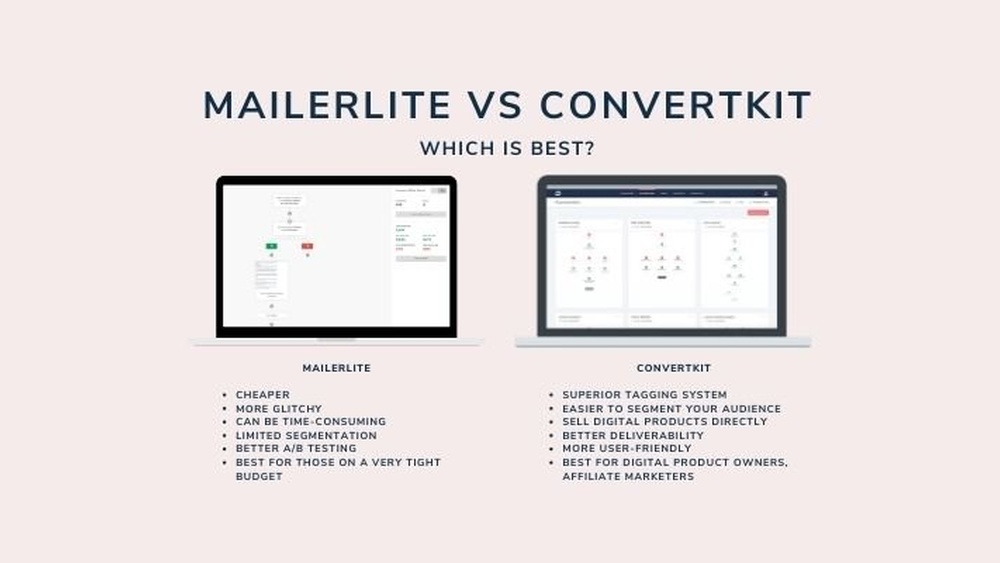
Choosing the right email marketing platform can feel overwhelming, especially when you’re trying to grow your audience and boost sales. You’ve probably heard about ConvertKit and MailerLite, two popular options that promise powerful tools—but which one truly fits your needs?
Whether you want easy-to-use templates, advanced automation, or seamless ways to sell digital products, this comparison will help you decide. Stick with me, and by the end of this article, you’ll know exactly which platform matches your goals and makes your email marketing easier and more effective.
Let’s dive in and find the perfect fit for you.
Pricing Comparison
MailerLite offers a free plan that allows up to 1,000 subscribers and 12,000 emails per month. This plan includes basic features like email automation and landing pages. ConvertKit also has a free plan, but it limits you to 1,000 subscribers with unlimited emails. The free plan includes forms and landing pages but lacks advanced automation.
| Subscription Tier | MailerLite | ConvertKit |
|---|---|---|
| Free Plan | Up to 1,000 subscribers, 12,000 emails/month | Up to 1,000 subscribers, unlimited emails |
| Paid Plan Start | $10/month for 1,000 subscribers | $15/month for 1,000 subscribers |
| Advanced Features | Automation, landing pages, 24/7 support | Advanced tagging, automation, integrations |
MailerLite is known for affordable pricing and a simple interface. It offers good value for small businesses and beginners. ConvertKit costs a bit more but suits creators who need advanced subscriber management and marketing tools.

Credit: expressionbytes.com
Email Design And Editor
Template variety differs in each platform. MailerLite offers a wide range of modern templates that suit many industries. ConvertKit has fewer templates but focuses on clean, simple designs ideal for creators.
Both platforms have drag-and-drop builders. MailerLite’s builder is very visual and easy to use for beginners. ConvertKit’s editor is simpler, focusing on text and less on visuals.
Customization options are available on both. MailerLite allows more changes to colors, fonts, and layout. ConvertKit lets users customize emails but keeps the style minimal to keep things clear.
Automation And Segmentation
Workflow complexity differs between ConvertKit and MailerLite. ConvertKit offers advanced automation with multiple steps and conditions. MailerLite provides a simpler, more visual workflow builder. This makes MailerLite easier for beginners but less flexible for complex campaigns.
Tagging and targeting are more detailed in ConvertKit. It allows precise segmentation based on subscriber actions and tags. MailerLite uses basic tags and groups, which suits small to medium lists but lacks deep customization.
Behavior-based sequences in ConvertKit enable sending emails triggered by specific subscriber actions, like clicks or purchases. MailerLite supports automation triggers too, but they are more limited in scope and options.
Selling Digital Products
Native commerce features help sell digital products easily. ConvertKit offers built-in tools like paid newsletters and tip jars. MailerLite focuses more on simple checkout pages and order forms. Both platforms let you accept payments directly without extra apps.
Third-party integrations expand functionality. ConvertKit connects with popular platforms like Shopify and Teachable. MailerLite works well with Zapier, WooCommerce, and Etsy. These integrations help automate tasks and link your store with email marketing.
Monetization tools are essential for creators. ConvertKit provides advanced tagging and subscriber segmentation to target buyers. MailerLite includes basic automation and pop-up forms for capturing leads. Both platforms support selling courses, ebooks, and memberships.
Ease Of Use
MailerLite offers a clean and simple user interface. It uses a drag-and-drop editor that is easy to understand. The setup process is quick and mostly automated. Users can start sending emails within minutes. The learning curve is gentle, making it ideal for beginners. Few steps are needed to create campaigns or landing pages.
ConvertKit (now Kit) has a more minimalist design. Its interface focuses on tagging and subscriber management. The setup process may take longer due to more options. Beginners might find it a bit harder to learn. It requires understanding of automation and sequence building. Still, creators who sell digital products benefit from its features.
| MailerLite | ConvertKit (Kit) | |
|---|---|---|
| User Interface | Simple, drag-and-drop, beginner-friendly | Minimalist, focused on tags and subscribers |
| Setup Process | Quick and mostly automated | More steps, detailed setup |
| Learning Curve | Easy for beginners | Requires time to understand automation |

Credit: www.emailtooltester.com
Integrations And Compatibility
ConvertKit and MailerLite both support many popular apps, making them flexible for different needs. They work well with tools like Zapier, Shopify, and WordPress.
API access is available on both platforms, but ConvertKit’s API is more advanced. This helps users build custom integrations and connect with other software easily.
For ecommerce platforms, both integrate with major services. ConvertKit supports Shopify and WooCommerce well, ideal for creators selling courses or products. MailerLite also connects with Shopify and BigCommerce, good for small stores.
Customer Support
Customer support for ConvertKit and MailerLite differs in availability and channels. ConvertKit offers live chat and email support, available during business hours. MailerLite provides 24/7 email support and live chat on paid plans.
Both platforms have help centers with articles and guides. ConvertKit’s resources focus on creators and selling digital products. MailerLite’s help includes step-by-step tutorials and marketing tips.
A community forum is active for each service. ConvertKit has a creator-focused group for sharing ideas. MailerLite’s community helps users with general email marketing questions.
Training options include webinars and courses. ConvertKit offers more creator-specific training. MailerLite provides basic and advanced marketing lessons.

Credit: weekendgrowth.com
Unique Features
ConvertKit offers unique creator-focused tools designed for digital product sellers. It features advanced tagging and complex subscriber journeys to help manage audiences effectively.
Its newsletter and tip jar options allow creators to monetize their content directly. This makes it easier to receive support and payments from fans.
MailerLite focuses on simplicity with a user-friendly drag-and-drop builder for emails and landing pages. It provides a budget-friendly free plan, perfect for beginners and small businesses.
MailerLite’s advanced subscriber management includes segmentation and automation. It helps users target the right audience without complexity.
Which One Fits Your Needs
Creators benefit from ConvertKit’s tools designed for selling digital products and courses. Its advanced tagging and subscriber journey features help manage audiences well. ConvertKit also supports paid newsletters and tip jars, making it ideal for monetization.
Small businesses may prefer MailerLite for its easy drag-and-drop builder and polished email templates. It offers a simple way to create professional campaigns without much effort. MailerLite also includes strong automation and segmentation features that are easy to use.
| Feature | ConvertKit | MailerLite |
|---|---|---|
| Best for | Creators selling digital products | Small businesses and beginners |
| Pricing | Higher, focused on creators | More budget-friendly options |
| Email Templates | Basic, clean designs | Visual, drag-and-drop editor |
| Automation | Complex subscriber journeys | Intuitive and easy to set up |
How Our Company Can Help You with Convertkit Vs Mailerlite
Practical Insights for Choosing Between ConvertKit and MailerLite
When deciding between ConvertKit and MailerLite, understanding their automation and segmentation capabilities can offer valuable practical learning. For instance, experimenting with each platform’s automation workflows helps you grasp how to nurture your audience effectively. Additionally, exploring their email design editors reveals which interface aligns better with your creative workflow—essential for maintaining brand consistency.
From HostingAdvise’s research-backed reviews, it’s clear that ease of use plays a crucial role, especially for beginners or bloggers. Hands-on trials focusing on integrations and compatibility with your existing tools can further clarify which service fits your unique setup.
- Test automation sequences to see which platform suits your marketing style.
- Compare email editors by designing sample campaigns to evaluate usability.
- Check integration options to ensure seamless workflow with your website or CRM.
For additional guidance, HostingAdvise offers in-depth articles and expert analysis to support your decision-making. You can also reach out via their contact page for personalized advice tailored to your digital marketing goals.
Frequently Asked Questions
Is Convertkit Better Than Mailerlite?
ConvertKit excels in advanced automation and digital product sales, while MailerLite offers a stronger free plan and user-friendly design. Choose ConvertKit for complex funnels; pick MailerLite for budget-friendly pricing and intuitive email creation. Both suit creators but serve different needs effectively.
Why Did Convertkit Rebrand?
ConvertKit rebranded to Kit to better reflect its expanded focus on creators and monetization tools. The new brand emphasizes simplicity and innovation.
What Is Better Than Mailerlite?
ConvertKit (now Kit) often outperforms MailerLite for creators needing advanced automation and digital product selling features.
Which Is Better, Flodesk Or Convertkit?
Flodesk offers easy, stylish email designs and branding. ConvertKit excels in advanced automation and digital product sales. Choose based on design ease or complex marketing needs.
Conclusion
Both ConvertKit and MailerLite offer strong tools for email marketing. MailerLite suits those who want easy design and low cost. ConvertKit fits creators selling courses and needing complex features. Consider your goals and budget before deciding. Choose the platform that matches your needs best.
Either way, you get reliable support and useful automation. Start simple and grow your email marketing step by step.









Leave a comment