



You’ve probably noticed how frustrating it is when a website takes forever to load. But did you know your web hosting choice could be the hidden reason behind those slow speeds?
Your website’s speed and overall performance depend a lot on the quality of your hosting. If your host uses outdated hardware or places your site on a crowded server, your visitors won’t stick around long. This can hurt your search rankings, increase bounce rates, and ultimately cost you business.
You’ll discover exactly how web hosting impacts your site’s speed and what you can do to make sure your visitors have the fast, smooth experience they expect. Keep reading to unlock the secrets to better website performance.
Credit: blueoxweb.com
Server Hardware And Speed
Server hardware plays a crucial role in website speed and performance. It forms the backbone of how fast your site loads and responds. Fast, modern hardware ensures smooth data handling. Slow or outdated equipment causes delays and lags.
Choosing a hosting provider with up-to-date hardware improves visitor experience. It also helps your site rank better on search engines. Let’s explore the key hardware components affecting speed.
Cpu, Ram, And Ssd Impact
The CPU acts as the brain of the server. It processes all requests from visitors. A powerful CPU can handle many visitors at once without slowing down. Low-quality or old CPUs struggle under heavy traffic.
RAM stores temporary data for quick access. More RAM means the server can manage more tasks simultaneously. Insufficient RAM causes slow loading and errors during peak times.
SSD storage is much faster than traditional hard drives. It reads and writes data quickly, reducing page load times. Websites hosted on SSD servers load significantly faster and run smoother.
Effects Of Outdated Equipment
Old servers with slow CPUs, limited RAM, and traditional hard drives cause slow websites. They take longer to process requests and deliver content. Visitors may leave before the page fully loads.
Outdated hardware also risks frequent crashes and downtime. This harms user trust and search engine rankings. Regular hardware upgrades keep your site fast and reliable.
Hosting Types And Performance
Choosing the right hosting type is vital for your website’s speed and performance. Different hosting options offer varying levels of resources and control. These differences affect how quickly your site loads and how well it handles traffic. Understanding the strengths and limits of each hosting type helps you make better decisions for your website.
Shared Hosting Limitations
Shared hosting means your site shares server resources with many others. This setup saves money but can slow your website. If other sites use too much bandwidth or CPU, your site will lag. Traffic spikes on other sites cause delays for everyone on the server. Shared hosting often has limited RAM and processing power. These limits reduce your site’s ability to handle many visitors at once. Overall, shared hosting may work for small sites but can hurt speed and performance as traffic grows.
Benefits Of Vps And Dedicated Hosting
Virtual Private Server (VPS) hosting offers dedicated resources within a shared server. Your site gets guaranteed CPU, RAM, and storage. This setup improves speed and stability over shared hosting. VPS lets you customize server settings to optimize performance. Dedicated hosting gives you an entire server for your website alone. This means full control and no resource sharing. Dedicated servers handle high traffic and complex applications easily. Both VPS and dedicated hosting provide better uptime and faster page loads. They suit growing websites that need reliable and consistent performance.
Server Location And Latency
Server location plays a vital role in website speed and performance. It affects how quickly data travels between the server and the user’s device. Latency, or the delay before data transfer begins, increases with distance. This delay can cause slower page loads and a poor user experience.
Choosing a server close to your main audience helps reduce latency. The shorter the distance data must travel, the faster your website loads. This speed boost can improve user satisfaction and search engine rankings.
Distance From Users
The physical distance between your server and website visitors impacts loading times. Data packets travel through various networks and devices. The longer the journey, the higher the latency. This delay causes slower response times and can frustrate users.
For example, a server located in Europe will load slower for visitors in the United States. The increased distance adds milliseconds to each data request. These milliseconds add up, making your website feel sluggish.
Choosing The Right Data Center
Selecting a data center near your target audience is crucial. Many hosting providers offer multiple data center locations worldwide. Pick the one closest to your visitors for faster load times.
Some data centers also offer better network infrastructure. This includes faster connections and more reliable hardware. A high-quality data center reduces latency and improves overall website performance.
Resource Throttling Risks
Resource throttling occurs when a web host limits your site’s use of CPU, memory, or bandwidth. These limits are often hidden and can slow your website without warning. Throttling helps hosts manage shared resources but can harm your site’s speed and performance.
When your site hits these limits, users may experience delays, timeouts, or even downtime. Understanding resource throttling risks helps you choose the right hosting plan and avoid surprises.
Silent Cpu And Memory Caps
Hosts often set CPU and memory limits to control server load. These caps may not be clearly stated. Your site can reach these limits quietly, causing slow page loads or errors. You might not realize throttling is happening.
Silent caps hurt your user experience. They also reduce your site’s ability to handle multiple visitors at once. Sites on shared hosting plans face this risk the most.
Impact On Traffic Spikes
Traffic spikes test your hosting resources. If your host throttles during high traffic, your site slows or crashes. Visitors see slow pages or error messages.
Traffic spikes are common during promotions or viral content. Without enough resources, your site cannot cope with sudden visitor surges. This leads to lost sales and poor SEO rankings.
Software Configuration And Caching
Software configuration and caching play a critical role in website speed and performance. Proper setup of server software ensures that your site runs efficiently and responds quickly. Caching helps reduce the load on the server by storing copies of web pages or data, allowing faster delivery to visitors. Both factors work together to create a smoother browsing experience and improve overall site performance.
Modern Php And Server Software
Using the latest versions of PHP and server software improves processing speed. Modern PHP versions handle code faster and use less memory. Updated server software supports advanced features that boost performance and security. Staying current with software reduces errors and downtime. It also ensures compatibility with new web technologies and plugins.
Server-side Caching Benefits
Server-side caching stores frequently requested data closer to the server. This reduces the time it takes to generate pages for visitors. Caching lowers the number of database queries, easing server load. It speeds up page delivery, which keeps users engaged and reduces bounce rates. Many hosting providers offer built-in caching tools that can be easily enabled for better performance.

Credit: www.ultimatewb.com
Security And Website Speed
Security and website speed are closely connected. A secure hosting environment protects your site from threats that slow it down. Every website needs strong security to keep performance steady. Poor security allows malware and attacks. These can cause slow loading times and downtime. A fast website builds trust and keeps visitors engaged. Security helps maintain that speed by stopping harmful activity early.
Effects Of Malware On Performance
Malware can drastically reduce your website speed. It uses server resources for harmful tasks. This leaves less power for your site’s content. Malware can cause high CPU usage and memory drain. It may also increase bandwidth use without reason. Visitors face slow pages or errors. Search engines may flag your site as unsafe. This reduces traffic and damages reputation. Removing malware takes time and may cause downtime.
Hosting Provider Security Features
Good hosting providers offer built-in security features. Firewalls block malicious traffic before it reaches your site. Regular malware scans catch infections early. Automatic backups allow quick recovery after attacks. SSL certificates encrypt data to protect visitors. DDoS protection prevents large attacks from overwhelming servers. These features keep your website safe and fast. They reduce the chance of slowdowns caused by security breaches. Choosing a secure host improves both speed and reliability.
Evaluating Hosting Performance
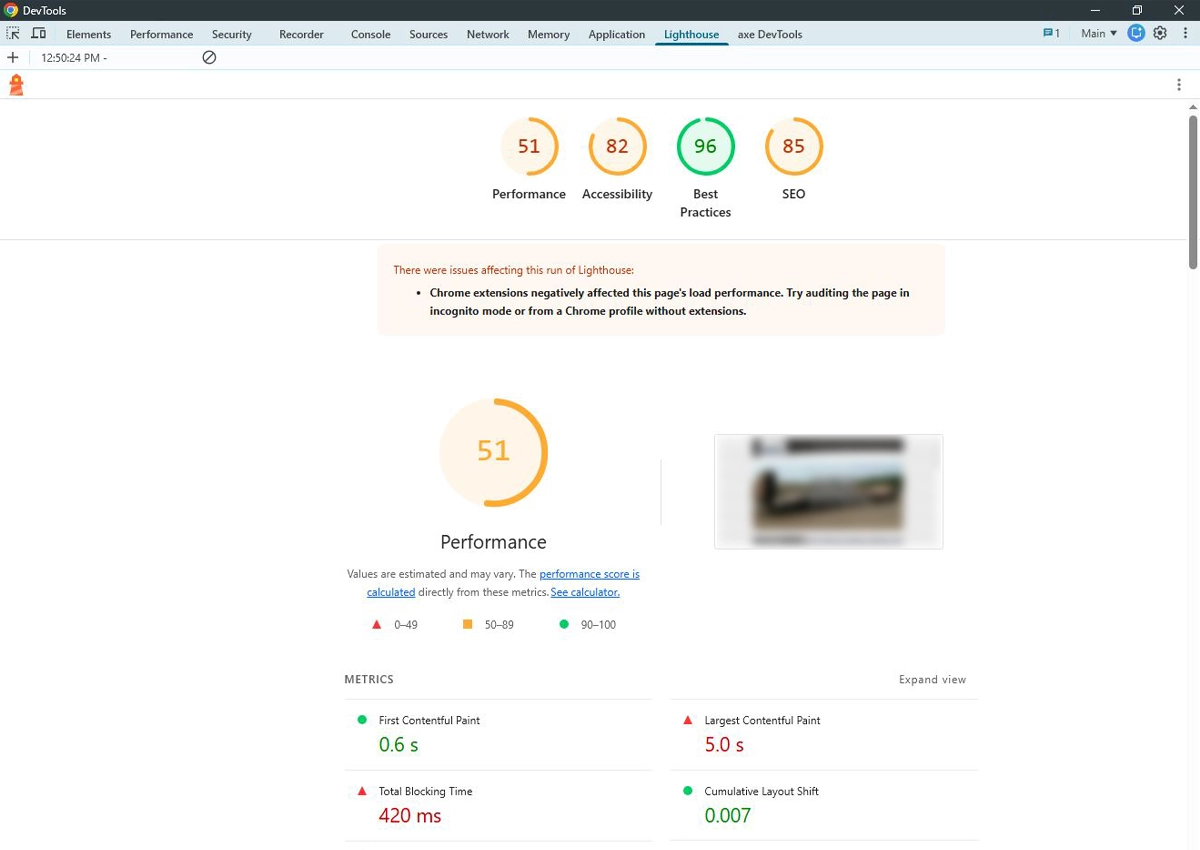
Evaluating hosting performance is essential to understand how your web host influences website speed and user experience. Testing tools help identify strengths and weaknesses of your hosting service. These insights guide improvements for faster loading times and better site reliability.
Regular performance checks highlight how the hosting server handles traffic and data delivery. They reveal if your host meets the demands of your website visitors. Accurate evaluation prevents slowdowns that can harm your site’s reputation and rankings.
Using Google Pagespeed Insights
Google PageSpeed Insights analyzes your website speed on desktop and mobile devices. It measures loading times and suggests improvements for better performance. The tool shows scores based on real user data and lab tests.
PageSpeed Insights points out issues like slow server response time, large images, or render-blocking scripts. It helps you see if the web host delivers content quickly. Fast server response boosts your overall score and user satisfaction.
Testing With Gtmetrix
GTmetrix provides a detailed report on website loading speed and performance metrics. It combines data from Google Lighthouse and other sources. This tool breaks down load times for each page element.
You can test your site from different locations to check hosting speed globally. GTmetrix highlights server response time, page size, and requests count. These details reveal if your host handles data efficiently and supports fast page loads.
Optimizing Hosting For Speed
Optimizing hosting for speed is essential for fast website performance. Choosing the right hosting setup improves loading times and user experience. Slow hosting can cause delays, affecting visitor satisfaction and search rankings.
Speed optimization starts with understanding hosting limitations and upgrading when needed. Small changes in hosting can lead to significant improvements in site responsiveness. Careful selection and management of hosting resources keep your website running smoothly.
Upgrading Hosting Plans
Upgrading to a higher hosting plan gives access to better resources. More RAM, faster processors, and increased bandwidth reduce loading delays. Higher-tier plans often include SSD storage, which reads data quicker than traditional drives.
Plans like VPS or dedicated hosting offer isolated resources, unlike shared hosting. Isolation means your site won’t slow down due to other users’ traffic spikes. Upgrading plans also improves security and reliability, aiding consistent performance.
Switching To Better Providers
Switching to a hosting provider with strong infrastructure boosts speed. Leading providers use modern data centers with advanced hardware. They also offer content delivery networks (CDNs) to serve content closer to visitors.
Top providers ensure minimal downtime and fast support response. Choosing a host with servers near your target audience reduces latency. Better providers maintain updated software and security patches, preventing slowdowns caused by outdated systems.
Impact On Seo And User Experience
Website speed and performance strongly influence SEO and user experience. Hosting quality impacts how fast pages load and how smoothly the site runs. Slow websites frustrate visitors and hurt rankings.
Search engines favor fast-loading websites in their results. Users expect quick access to content. When hosting slows your site, both search engines and users respond negatively.
Hosting And Search Rankings
Search engines use page speed as a ranking factor. Better hosting means faster servers and quicker page delivery. Faster sites get higher placement in search results. Slow hosting lowers your chance to appear on the first page.
Reliable hosting reduces downtime. Search engines lower rankings for sites that are often offline. Consistent uptime improves crawl frequency and indexation. Hosting stability supports better search visibility.
Reducing Bounce Rates
Visitors leave slow sites quickly. High bounce rates signal poor user experience to search engines. Fast hosting lowers bounce rates by loading pages swiftly. Visitors stay longer and explore more pages.
Good hosting supports smooth navigation and fast response times. This keeps users engaged and encourages return visits. A positive user experience drives better site performance and reputation.

Credit: simtechdev.com
How Our Company Can Help You with How Does Web Hosting Affect Website Speed And Performance?
Practical Learning: Applying Hosting Insights to Improve Your Website
Understanding how server hardware and hosting types influence website speed is just the beginning. For anyone serious about optimizing performance, exploring software configuration and caching techniques offers practical opportunities to see real improvements firsthand. By experimenting with caching settings or selecting a hosting plan that aligns with your site’s resource needs, you can directly affect loading times and overall user experience.
Evaluating hosting performance isn’t purely theoretical—it’s about gathering evidence from your own website metrics and user feedback, much like HostingAdvise encourages through its balanced, research-based approach. This method aligns with the principles of E-E-A-T (Experience, Expertise, Authority, and Trustworthiness) and helps you make informed decisions rather than relying on assumptions.
- Test different server locations to understand latency effects
- Monitor resource throttling to avoid unexpected slowdowns
- Adjust caching and security settings for optimal speed
For further guidance or to discuss specific hosting concerns, reaching out to knowledgeable communities or consulting resources like HostingAdvise can provide clarity without the pressure of sales. This approach empowers beginners and developers alike to confidently enhance their site’s speed and performance.
Frequently Asked Questions
How Does Hosting Affect The Performance Of A Website?
Hosting affects website performance by determining server speed, hardware quality, and proximity to users. Faster, dedicated servers reduce load times and improve SEO rankings. Poor hosting causes delays, higher bounce rates, and lower conversions. Efficient hosting ensures quick data delivery, enhancing user experience and search visibility.
What Are The 4 Types Of Web Hosting?
The four types of web hosting are shared, VPS (Virtual Private Server), dedicated, and cloud hosting. Each offers different resource levels and control.
Do I Really Need Web Hosting?
Yes, web hosting is essential to make your website accessible online. It ensures fast loading, reliability, and better SEO performance. Without hosting, your site won’t be visible to users or search engines, limiting your online presence and business growth.
What Factors Affect Website Loading Speed?
Website loading speed depends on server quality, hosting type, image sizes, code efficiency, caching, and geographic server location.
Conclusion
Web hosting plays a key role in website speed and performance. Choosing reliable hosting improves load times and user experience. Fast servers reduce wait times and keep visitors engaged. Poor hosting can cause slow pages and lost traffic. Hosting location affects how quickly data reaches users.
Better hardware and dedicated resources boost overall site stability. Website success depends on solid hosting foundations. Speed influences search rankings and customer satisfaction. Invest in quality hosting to keep your site running smoothly.












Leave a comment