



Choosing the right web hosting plan can feel overwhelming. You want your website to run smoothly, load fast, and stay online without interruptions.
But with so many options out there, how do you pick the perfect plan for your needs? This guide breaks down everything you need to know in simple terms, so you can make a confident choice. Whether you’re starting a personal blog, an online store, or a business site, understanding the key factors will save you time, money, and headaches.
Keep reading to discover how to find a web hosting plan that fits your goals and sets your site up for success in 2026.
Types Of Web Hosting
Choosing the right type of web hosting is key for your website’s success. Different hosting types offer various features and resources. Each suits specific needs and budgets. Understanding the main types helps you pick the best option for your site.
Shared Hosting
Shared hosting means your website shares a server with other sites. It is the most affordable option. Ideal for small websites or blogs with low traffic. Resources like storage and bandwidth are divided among users. It is easy to set up but may be slower during peak times.
Dedicated Hosting
Dedicated hosting gives you an entire server for your website. It offers the highest level of control and performance. Best for large businesses or sites with high traffic. You manage all server settings and security. It is more expensive but provides fast and reliable service.
Vps Hosting
VPS stands for Virtual Private Server. It splits a physical server into multiple virtual servers. Each user gets dedicated resources and more control than shared hosting. VPS is a good middle ground between shared and dedicated hosting. Suitable for growing websites needing better speed and stability.
Cloud Hosting
Cloud hosting uses multiple servers to host your website. It offers excellent flexibility and scalability. Your site can handle traffic spikes easily. You pay only for the resources you use. Cloud hosting is reliable and has minimal downtime.
Managed WordPress Hosting
Managed WordPress hosting is designed specifically for WordPress sites. The host handles updates, backups, and security for you. This lets you focus on creating content. It includes optimized performance and expert support. Perfect for users who want hassle-free WordPress management.
Key Features To Consider
Choosing the right web hosting plan requires attention to several important features. These features affect your website’s performance, security, and ease of use. Knowing what to check helps you pick a plan that fits your needs and budget.
Focus on the main features that impact your site’s speed, safety, and support. Each feature plays a key role in how well your website will run and grow over time.
Storage And Bandwidth
Storage is the space your website files take up on the server. Choose enough storage to hold all your images, videos, and content. Bandwidth is the amount of data your site can send to visitors. Higher bandwidth means your site can handle more traffic without slowing down.
Uptime And Reliability
Uptime shows how often your website stays online without interruption. Look for a host with at least 99.9% uptime. Reliable hosting keeps your site accessible to visitors day and night. Downtime can hurt your visitors’ experience and your search rankings.
Security Measures
Strong security protects your site from hackers and malware. Check if the host offers SSL certificates, firewalls, and regular backups. Security features keep your data safe and build trust with your visitors.
Customer Support
Good customer support helps solve problems quickly. Look for 24/7 support through live chat, phone, or email. Fast and helpful support saves time and stress when technical issues arise.
Control Panel Options
The control panel lets you manage your hosting account easily. Popular panels like cPanel or Plesk simplify tasks such as installing apps and managing files. Choose a host with a user-friendly control panel that fits your skill level.
Performance Factors
Choosing the right web hosting plan depends heavily on performance factors. These elements affect how fast and reliable your website will be. A slow or unstable site can drive visitors away. Focus on key aspects that impact speed, flexibility, and uptime. Understanding these will help you pick the best hosting option for your needs.
Server Speed
Server speed determines how quickly your website loads. Faster servers improve user experience and SEO rankings. Look for hosts that use solid-state drives (SSDs) instead of traditional hard drives. SSDs provide faster data access. Also, check the server’s hardware and software optimizations. These enhance overall response time.
Scalability
Scalability means your hosting can grow with your website. Choose a plan that easily upgrades to higher resources. This avoids downtime during traffic spikes. It also saves money by starting small and expanding only when needed. Cloud hosting often offers good scalability options for fast growth.
Load Handling
Load handling refers to how well servers manage many visitors at once. A hosting plan with poor load handling may crash under heavy traffic. Look for hosts that guarantee stable performance during peak hours. Features like load balancing and resource allocation help manage traffic efficiently.
Data Center Locations
Data center location affects website loading speed globally. Choose a host with data centers near your main audience. Closer servers reduce latency and improve connection speed. Some providers offer multiple locations worldwide. This option benefits sites targeting users in various regions.

Credit: zaidapp.com
Pricing And Plans
Choosing the right web hosting plan means understanding the pricing and what each plan offers. Plans vary widely in cost and features. Knowing the details helps avoid surprises later. Focus on what fits your website needs and budget.
Comparing Costs
Look beyond the price tag. Some plans seem cheap but offer limited resources. Others cost more but include extra features like better speed and security. Check what you get for the price. Balance cost with value for your site.
Renewal Fees
Initial prices often come with discounts. After the first term, renewal fees can rise sharply. Read the fine print on renewal costs. Plan your budget for the long term, not just the first year.
Free Trials And Money-back Guarantees
Free trials let you test hosting without paying upfront. Money-back guarantees provide a safety net if you are unhappy. Use these offers to try the service risk-free. Confirm how long these periods last before signing up.
Add-on Services
Add-ons can increase your monthly bill. Common extras include SSL certificates, backups, and email accounts. Decide which add-ons are essential for your website. Avoid paying for features you do not need.
Popular Hosting Providers
Choosing a web hosting plan starts with knowing the top providers in the market. Popular hosting providers offer reliable services, good support, and useful features. They cater to different needs, from small blogs to large business websites. Understanding their strengths helps you pick the right plan for your site.
Hostinger
Hostinger is famous for its low prices and fast speeds. It offers shared, cloud, and VPS hosting options. The control panel is user-friendly, ideal for beginners. Hostinger includes free SSL certificates and daily backups. Their customer support is active and helpful 24/7.
Bluehost
Bluehost is a top choice for WordPress users. It provides easy WordPress installation and automatic updates. Their plans include free domain registration for the first year. Bluehost offers reliable uptime and a simple dashboard. The support team is ready to assist through chat and phone.
Siteground
SiteGround is known for excellent speed and security features. It uses Google Cloud servers for better performance. SiteGround offers daily backups and free SSL certificates. Their customer service is fast and knowledgeable. It suits small businesses and growing websites well.
Dreamhost
DreamHost offers flexible hosting plans with a 97-day money-back guarantee. It supports WordPress and includes free domain privacy. DreamHost provides unlimited traffic and storage on most plans. Their custom control panel is simple to use. Support is available through live chat and email.
Hostgator
HostGator provides affordable hosting with scalable plans. It includes free website migration and a 45-day money-back guarantee. HostGator supports multiple website types, including WordPress and eCommerce. Their uptime is reliable, and the control panel is easy. Customer support is accessible via live chat and phone.

Credit: www.aerobusinesssolutions.com
Choosing Based On Website Needs
Choosing the right web hosting plan depends mostly on your website’s needs. Different types of websites require different hosting features. The goal is to find a plan that fits your site’s size, traffic, and purpose.
Understanding your website’s demands helps avoid paying for unneeded features. It also ensures your site runs smoothly and loads fast for visitors.
Personal Blogs And Portfolios
Personal blogs and portfolios usually have low traffic and simple content. Shared hosting plans work well here. They are affordable and offer enough resources for basic websites.
Look for plans with easy website builders and good customer support. Storage needs are minimal, so focus on uptime and security instead.
Small Business Sites
Small business websites need reliability and some room to grow. Managed hosting or VPS plans offer better performance than shared hosting. They provide more control and faster loading times.
Choose plans with daily backups and SSL certificates. These features protect your site and build trust with customers.
E-commerce Stores
E-commerce sites require strong security and high uptime. Hosting plans with SSL encryption and PCI compliance are essential. These protect customer data during transactions.
Look for scalable plans that handle product catalogs and payment systems. Fast servers and reliable support prevent lost sales due to downtime.
High-traffic Websites
Websites with heavy traffic need powerful hosting solutions. Dedicated servers or cloud hosting work best. They offer high bandwidth and resource allocation.
Focus on plans with load balancing and content delivery networks. These keep your site stable and fast, even during traffic spikes.
Avoiding Common Pitfalls
Choosing the right web hosting plan involves more than just picking the cheapest option. Many beginners face common pitfalls that can cause problems later. These issues might slow down your site, increase costs, or make managing your website harder. This section highlights the main traps to avoid for a smooth web hosting experience.
Hidden Fees
Some hosting providers advertise low prices but add extra fees later. These fees might include setup charges, renewal hikes, or costs for backups and security. Always read the fine print and check the total price for the entire contract. Avoid surprises by knowing what you will pay upfront.
Poor Customer Service
Good support is crucial, especially if you are new to web hosting. Slow or unhelpful customer service can leave your site down for hours. Test the provider’s support before buying. Choose companies with 24/7 live chat, fast response times, and positive reviews.
Limited Scalability
Your website might grow over time. Some plans cannot handle increased traffic or added features. Look for hosting that allows easy upgrades to higher plans or resources. Avoid providers that force you to move to a new host as your site expands.
Unreliable Uptime
Uptime means how often your website stays online. Downtime can cost visitors and sales. Check the hosting company’s uptime guarantee. Aim for at least 99.9% uptime. Read user reviews to confirm their reliability before making a decision.
Setting Up Your Hosting Plan
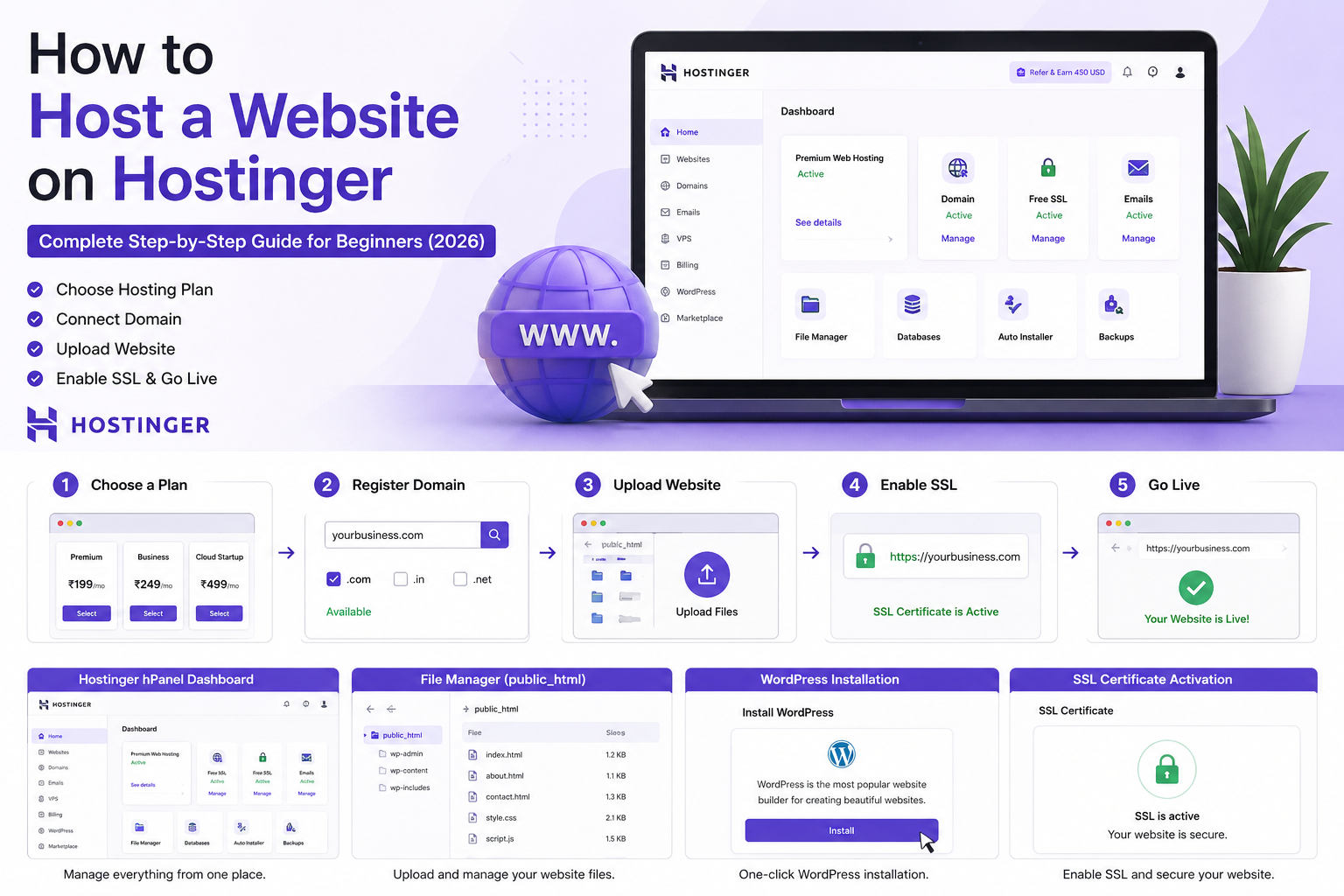
Setting up your hosting plan is the first step toward launching your website. It ensures your site runs smoothly and reaches your audience effectively. This stage involves several key actions, from registering your domain to securing your data. Proper setup helps avoid future problems and keeps your site reliable.
Domain Registration
Register your domain name to give your website an address online. Choose a domain that matches your brand or business name. Use a trusted registrar provided by your hosting company or a third party. Keep your registration details accurate to avoid losing ownership. Consider privacy protection to keep your personal information safe.
Installing Cms
Install a Content Management System (CMS) to build and manage your website easily. Popular CMS options include WordPress, Joomla, and Drupal. Many hosts offer one-click installations to save time. Choose a CMS that fits your website goals and skill level. Regular updates keep your CMS secure and functioning well.
Configuring Email
Create custom email addresses using your domain to appear professional. Set up email accounts through your hosting control panel. Use IMAP or POP3 settings to connect your email to devices. Consider email forwarding and autoresponders for better communication. Secure your emails with strong passwords and spam filters.
Backup Solutions
Implement backup solutions to protect your website data. Use automated backups offered by your hosting provider or third-party services. Schedule backups regularly to avoid data loss. Store backups in different locations, such as cloud storage or offline drives. Test your backups to ensure you can restore data when needed.
Credit: svswebtechsolutions.com
How Our Company Can Help You with How to Choose a Web Hosting Plan Guide 2026
Applying Your Knowledge: Practical Steps to Master Web Hosting Choices
After exploring types of web hosting and key features to consider, it’s valuable to engage in hands-on learning to solidify your understanding. Experimenting with different hosting plans on test sites can reveal how performance factors like uptime and loading speed directly affect user experience. This practical approach helps clarify what pricing tiers actually offer in real terms, beyond just the listed specs.
- Set up a basic website on shared hosting to experience its limitations and benefits firsthand.
- Try a VPS or cloud hosting trial to compare scalability and control options.
- Review customer feedback and technical documentation from popular providers to develop a balanced, evidence-based perspective.
HostingAdvise’s mission focuses on helping readers navigate these choices with confidence by combining verified user insights and official resources. If questions arise during your learning process, consulting knowledgeable forums or reaching out to hosting support teams can provide practical guidance aligned with your specific website needs.
Frequently Asked Questions
What Factors Should I Consider When Choosing Web Hosting?
Consider uptime reliability, speed, customer support, storage, bandwidth, and pricing. Also, check for scalability and security features to meet future needs.
Which Type Of Web Hosting Is Best For Beginners?
Shared hosting is ideal for beginners due to its affordability and ease of use. It offers sufficient resources for small websites.
How Important Is Customer Support In Web Hosting?
Customer support is crucial for resolving technical issues quickly. Choose a host with 24/7 support via chat, phone, or email.
Should I Choose Managed Or Unmanaged Web Hosting?
Managed hosting suits those wanting hassle-free maintenance, while unmanaged hosting offers more control but requires technical skills.
Conclusion
Choosing the right web hosting plan takes careful thought. Focus on your website’s needs first. Consider speed, storage, and security features. Balance your budget with the features offered. Don’t forget to check customer support quality. A reliable host keeps your site online and safe.
Take your time to compare plans clearly. The right choice helps your website grow smoothly. Start with what fits your current needs best. Upgrade later as your website expands and changes.













Leave a comment