



Are you confident your website’s web hosting is set up for success? If you’re making some common web hosting mistakes, you could be losing visitors, clients, and even money without realizing it.
Choosing the wrong plan, ignoring site speed, or neglecting security might seem small at first—but these errors quickly add up, hurting your site’s performance and reputation. You’ll discover the pitfalls many website owners fall into and learn how to avoid them.
Keep reading to make sure your web hosting works for you—not against you.

Credit: www.infoskysolutions.com
Choosing The Wrong Hosting Type
Shared hosting means many websites share one server. It is cheaper but may slow down your site. Security risks are higher since other sites share the same space.
Dedicated hosting gives you a whole server to yourself. It costs more but offers better speed and security. Perfect for bigger websites with more visitors.
| Hosting Type | Cost | Speed | Security | Best For |
|---|---|---|---|---|
| Shared Hosting | Low | Slower | Lower | Small websites, beginners |
| Dedicated Hosting | High | Faster | Higher | Large websites, businesses |
Ignoring scalability needs causes trouble later. Choose hosting that can grow with your site. Cloud hosting offers flexible resources and good uptime.
Cloud hosting spreads data across many servers. It handles traffic spikes well and reduces downtime. Overlooking its benefits limits your website’s performance.
Falling For Low-cost Traps
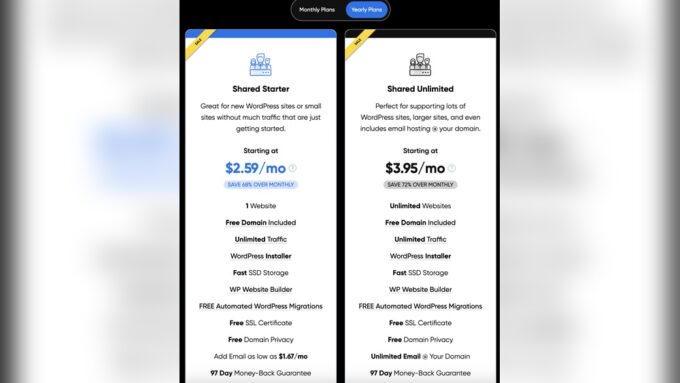
Hidden fees often surprise users after the initial low price. These costs include renewal fees, setup charges, and extra for backups or support. Always read the fine print before buying.
Choosing hosting based only on price can cause slow site speed, poor uptime, and limited customer support. Cheap plans usually have fewer features and less security.
Free hosting sounds good but has many limitations. Expect ads on your site, limited storage, and no custom domain. These make your website look unprofessional and hurt your brand.
Neglecting Website Performance
Slow page load times frustrate visitors and increase bounce rates. Websites must load quickly to keep users engaged. Large images, too many scripts, and poor server response slow pages down. Optimizing images and using a fast hosting service help speed up load times.
Poor mobile responsiveness makes websites hard to use on phones and tablets. Many users visit sites on mobile devices. A site that does not adjust well will lose visitors. Responsive design ensures content looks good and works well on all screen sizes.
Lack of caching and optimization causes repeated loading of the same data. Caching stores parts of a website to reduce load time on repeat visits. Without it, servers work harder and pages load slower. Tools like browser caching and content delivery networks improve performance.
Ignoring Security Measures
Many websites suffer from weak SSL implementation. This leaves data unprotected and visitors at risk. SSL certificates must be properly installed and renewed on time. Otherwise, browsers warn users about unsafe sites. This scares visitors away and hurts trust.
Inadequate backup solutions cause big problems. Without regular backups, important website data can be lost forever. Some hosts do not offer automatic backups. Others keep backups for too short a time. Always choose a host that provides reliable, frequent backups.
| Shared Hosting Vulnerabilities | Risks |
|---|---|
| Multiple websites on one server | One hacked site can spread malware to others |
| Limited control over security settings | Hard to fix security holes quickly |
| Shared resources | Performance may suffer if others use too much |
Overlooking Support And Features
Many web hosts offer limited customer support options. This can leave users stuck during urgent problems. Phone, chat, and email support are key. Without these, solving issues takes longer.
Essential tools like automatic backups, SSL certificates, and site builders often get overlooked. Missing these tools can cause security risks and extra work.
Control panel usability is another big factor. A complex or cluttered control panel can confuse beginners. Easy navigation and clear options help users manage their sites better.
| Common Issue | Impact |
|---|---|
| Limited Customer Support | Long wait times and unresolved problems |
| Missing Essential Tools | Security risks and harder website management |
| Poor Control Panel Usability | Confusion and difficulty managing the website |
Failing To Define Hosting Needs
Traffic expectations must be clear before choosing a hosting plan. Underestimating visitors can cause your website to slow or crash. Overestimating wastes money on unneeded features.
Storage and bandwidth need to match your content size and traffic. Small storage limits your files and images. Low bandwidth restricts data transfer, causing slow load times.
Plans with insufficient resources lead to a poor user experience. Visitors may leave quickly and hurt your site’s reputation.
Planning for future growth prevents frequent hosting changes. Select a provider that allows easy upgrades. This saves time and avoids downtime as your site grows.
Website Design And User Experience Errors
Cluttered layouts make websites hard to read and use. Visitors get confused by too many images or words packed close together. Clear space helps users find important info fast.
Poor navigation structure frustrates visitors. Menus should be simple and easy to follow. Using many drop-downs or hidden links can cause users to leave quickly.
Outdated content and broken links hurt trust and search rankings. Pages with old info or links that don’t work make sites look unprofessional. Regular updates keep visitors engaged and improve site health.

Credit: www.readyserver.sg
Skipping Regular Maintenance
Skipping regular maintenance can cause big problems for your website. Neglecting software updates leaves your site open to bugs and errors. Old software may not work well with new tools or browsers.
Ignoring security patches is risky. These patches fix holes hackers can use. Without them, your site can get hacked easily. Data loss or theft might happen.
Forgetting regular backups means losing your work. If the site crashes or gets hacked, no backup means starting over. Backups keep copies of your site safe. They help restore it fast when needed.

Credit: www.dewlance.com
How Our Company Can Help You with Common Web Hosting Mistakes
Turning Hosting Mistakes into Learning Opportunities
Recognizing common web hosting mistakes—like choosing the wrong hosting type or neglecting website performance—opens doors for valuable learning. By understanding the specific needs of your site, you can avoid falling into low-cost traps that often compromise speed and security. For example, a basic shared hosting plan might seem budget-friendly but could lead to vulnerabilities or slower load times that frustrate visitors.
Taking a thoughtful approach to hosting means regularly assessing your website’s design and user experience alongside technical factors. This holistic view helps in making informed decisions, reinforcing the importance of regular maintenance and security measures.
- Evaluate your site’s traffic and resource demands before selecting a hosting plan.
- Prioritize hosts offering robust performance and security features.
- Stay proactive with updates and backups to prevent downtime or data loss.
Organizations like HostingAdvise, grounded in evidence-based research and verified user feedback, provide balanced insights that can guide these choices. For additional questions or tailored advice, reaching out to web hosting experts or consulting detailed guides can be a practical next step.
Frequently Asked Questions
What Are Some Common Website Mistakes?
Common website mistakes include poor navigation, slow loading times, outdated content, broken links, cluttered design, lack of mobile responsiveness, and missing contact information.
What Are The 4 Types Of Web Hosting?
The four types of web hosting are shared, VPS, dedicated, and cloud hosting. Each offers different performance, control, and cost levels.
What Is The Major Disadvantage Of Shared Web Hosting?
The major disadvantage of shared web hosting is limited resources, which can slow down your website during high traffic periods.
What To Look For In A Web Hosting Service?
Check for reliable uptime, fast loading speed, strong security, ample storage, and responsive customer support. Ensure scalable plans and regular backups. Choose hosts offering SSL certificates and easy website management tools. Compare pricing and features to fit your website’s needs and budget.
Conclusion
Avoiding common web hosting mistakes protects your website’s success. Choose the right plan based on your needs and budget. Keep your site clean and easy to navigate for visitors. Make sure your website loads fast and works well on phones.
Regularly back up your data to avoid losing important information. Good hosting helps improve your site’s security and performance. Small changes now save headaches and costs later. Stay informed and update your hosting choices as your website grows.










Leave a comment