




If you’re running a WordPress site, you might have heard about managed WordPress hosting but aren’t quite sure what it means or if it’s right for you. Imagine a hosting service that takes care of all the technical stuff—updates, security, backups—so you can focus on what matters most: growing your site and engaging your visitors.
That’s exactly what managed WordPress hosting offers. You’ll discover how this specialized hosting can simplify your life, boost your website’s performance, and keep it safe from threats. Ready to find out why so many website owners are making the switch?


Let’s dive into what managed WordPress hosting is and how it can work for you.
What Managed WordPress Hosting Means
Managed WordPress hosting means a service where your website is taken care of by experts. The hosting company handles updates, security, backups, and speed, so you don’t have to worry. This type of hosting is made just for WordPress sites, ensuring everything works well together.
The hosting provider offers automatic updates for WordPress software and plugins. They also monitor your site for security threats and fix problems quickly. This keeps your website safe and fast without extra effort.
Support teams are ready to help with WordPress-specific issues. They know how to solve plugin conflicts and other common problems. This saves time and avoids frustration for site owners who are not tech experts.
Key Features And Benefits
Automatic WordPress updates keep your site safe and current. These updates run in the background without your help. They fix bugs, add features, and close security holes quickly.
Enhanced security measures protect your site from hackers and malware. Firewalls, malware scans, and login protection work 24/7. You get peace of mind knowing your data is safe.
Optimized performance and speed mean faster loading times. Servers are tuned for WordPress, improving user experience and search rankings. Visitors stay longer on sites that load quickly.
Daily backups and restorations keep your data safe from loss. Files and databases are saved every day. If something goes wrong, you can restore your site with one click.
Expert WordPress support gives you access to professionals who know WordPress well. They help with technical issues, plugin conflicts, and site setup. Support saves time and reduces stress.
Who Should Use Managed Hosting
Business owners and bloggers benefit from managed hosting because it handles updates, backups, and security automatically. This allows them to focus on content and sales, not technical tasks. Non-technical users find managed hosting easy since the provider manages technical issues. There is no need to worry about software, server settings, or performance. Support teams help solve problems quickly.
Developers and agencies also use managed hosting for client sites. It offers faster site speed and strong security. They save time by offloading server management and updates. It also provides staging environments to test changes safely before going live. Managed hosting keeps sites running smoothly, which is crucial for professional work.

Credit: wpharbor.com
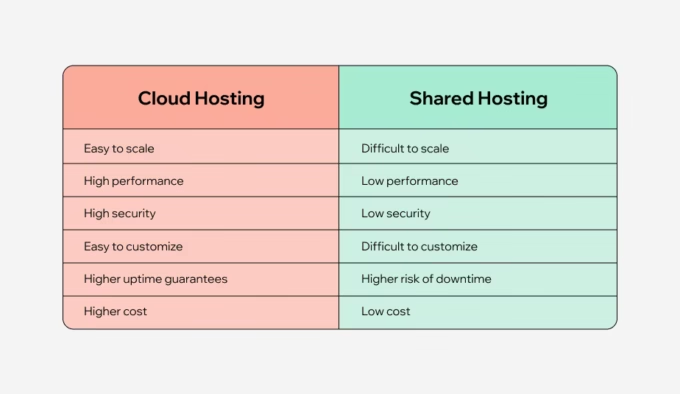
Managed Vs Shared Hosting
Managed hosting gives you dedicated resources just for your website. Shared hosting splits resources among many users. This can slow your site if others use too much power.
Managed hosting usually loads pages faster. It uses better servers and caching systems. Shared hosting can get slow when many sites use the same server.
| Aspect | Managed Hosting | Shared Hosting |
|---|---|---|
| Resource Allocation | Dedicated resources, no sharing | Resources shared with many websites |
| Performance & Speed | Optimized for WordPress, faster load times | Can be slower, affected by others |
| Security & Maintenance | Automatic updates, strong security checks | User responsible for updates and security |
Managed hosting includes regular backups and security scans. Shared hosting leaves these tasks to you. This makes managed hosting easier and safer.
Choosing The Right Provider
Evaluating features and services is key to choosing a managed WordPress host. Check for automatic updates to keep your site secure. Look for daily backups so you never lose data. Speed optimization is vital for good user experience. Also, 24/7 expert support helps with any problems.
Pricing and plans vary widely. Some providers offer monthly or yearly billing. Plans differ by storage space, bandwidth, and number of websites allowed. Pick a plan that fits your budget and needs. Watch out for hidden fees or costly add-ons.
| Provider | Starting Price (Monthly) | Key Features | Support |
|---|---|---|---|
| WP Engine | $25 | Automatic backups, speed optimization | 24/7 WordPress experts |
| Kinsta | $35 | Google Cloud hosting, daily backups | 24/7 chat support |
| SiteGround | $14.99 | Free SSL, daily backups | 24/7 phone & chat |
Setting Up Managed WordPress Hosting
Setting up managed WordPress hosting is simple and quick. Most providers offer an easy installation process that requires little technical skill. You can start your WordPress site within minutes using one-click installers.
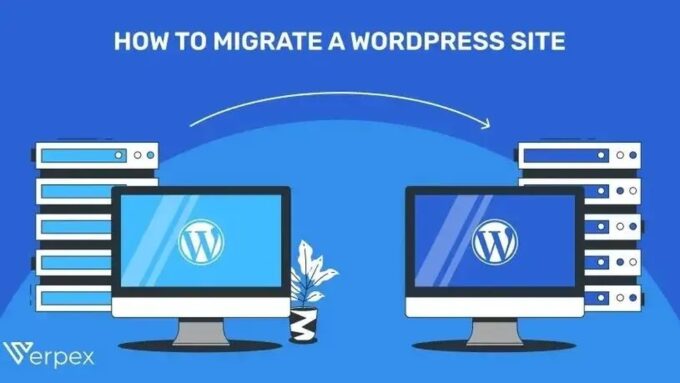
Migrating existing sites is made easy with tools that transfer your content safely. Some hosts offer free migration services to move your website without downtime or data loss.
Using staging environments allows testing changes before going live. This helps avoid mistakes by letting you preview updates and new features in a safe space. Staging makes website management safer and smoother.
Maintaining Your Managed WordPress Site
Regular backups keep your WordPress site safe from data loss. Schedule backups often. Store copies in multiple places. Updates fix bugs and improve security. Always update WordPress core, themes, and plugins. Skipping updates risks site crashes or hacks.
Security monitoring helps catch threats early. Use tools to scan for malware and suspicious activity. Set up alerts for unusual logins. Strong passwords and two-factor authentication add protection.
Performance optimization keeps your site fast. Clear cache regularly. Optimize images for quicker loading. Use a reliable content delivery network (CDN). Limit plugins to only those you need. Fast sites improve user experience and search rankings.

Credit: www.youtube.com
Common Challenges And Solutions
Plugin conflicts can cause site errors or slow performance. Using only trusted plugins helps reduce conflicts. Testing new plugins on a staging site avoids problems on the live site. Managed WordPress hosting providers often offer automatic conflict detection and expert support to solve these issues quickly.
Traffic spikes may overwhelm your server and slow down your site. Managed hosting plans usually include scalable resources that adjust with traffic. This keeps your website fast and available during busy times. Providers also use content delivery networks (CDNs) to handle heavy loads efficiently.
Downtime hurts your site’s reputation and visitors’ trust. Managed WordPress hosts provide 24/7 monitoring and fast issue resolution. They use reliable servers and have backup systems to restore your site quickly if needed. These features minimize downtime and keep your site online.

Credit: themeisle.com
How Our Company Can Help You with Managed WordPress Hosting Explained
Practical Learning with Managed WordPress Hosting
Understanding managed WordPress hosting goes beyond its definition—it opens doors to hands-on learning in areas like setup, maintenance, and troubleshooting. For beginners and experienced users alike, diving into the setup process offers insights into how managed environments optimize performance and security. Exploring maintenance routines reveals how updates and backups are streamlined, minimizing common challenges such as downtime or plugin conflicts.
At HostingAdvise, the emphasis on evidence-based reviews and verified user feedback helps readers gain a balanced view of different providers, fostering informed decisions. Practically, this means comparing features like automatic backups or expert support through reliable sources before committing. If questions arise or guidance is needed, reaching out to knowledgeable communities or support channels can deepen your understanding while ensuring your site runs smoothly.
- Experiment with staging environments to safely test changes.
- Monitor site performance using built-in tools.
- Learn to troubleshoot common issues with expert support resources.
Remember, engaging with these practical steps complements the theoretical knowledge covered and empowers you to manage your WordPress site confidently.
Frequently Asked Questions
Is Managed WordPress Hosting Worth It?
Managed WordPress hosting offers expert support, automatic updates, enhanced security, and optimized performance. It saves time and reduces technical hassles, making it worth the investment for serious WordPress users.
What Is The Difference Between WordPress Hosting And Managed WordPress Hosting?
WordPress hosting provides basic server space for your site. Managed WordPress hosting offers automatic updates, enhanced security, expert support, and optimized performance tailored to WordPress sites.
Why Are People Moving Away From WordPress?
People move away from WordPress due to complex updates, security risks, slow performance, and high maintenance needs.
What Is The Best Managed Hosting For WordPress?
The best managed WordPress hosting offers automatic updates, enhanced security, expert support, and optimized performance. Top providers include WP Engine, Kinsta, and SiteGround.
Conclusion
Managed WordPress hosting simplifies website management and boosts performance. It keeps your site secure with regular updates and backups. Expert support helps solve technical problems quickly. This hosting type saves time and reduces stress for site owners. Choosing managed hosting can improve your website’s speed and reliability.
It suits those who want to focus on content, not server issues. Overall, managed WordPress hosting offers a smooth, worry-free experience. Consider it for a hassle-free WordPress website.













Leave a comment