



Is your website feeling sluggish, or worse, going offline when visitors try to reach you? If you’ve noticed your site loading slowly, crashing unexpectedly, or struggling to handle more visitors, it’s a clear sign your current hosting isn’t cutting it.
Your website is the face of your business online, and every second it lags or disappears, you risk losing customers and credibility. But how do you know when it’s time to switch to better hosting? Keep reading—this article will help you spot the key signs that your hosting needs an upgrade, so you can keep your site fast, secure, and always available.


Frequent Downtime
Frequent downtime harms your website’s reputation and user trust. Visitors get frustrated when pages don’t load or the site is unreachable. This leads to lost customers and lower search rankings.
Common causes of downtime include server overload, poor hardware, software bugs, and cyberattacks. Sometimes, hosting providers perform maintenance that affects uptime.
Monitoring uptime is essential. Use tools that track your website’s availability and alert you instantly if the site goes down. This helps react quickly and minimize downtime effects.

Credit: ggservers.com
Slow Loading Speeds
Slow loading speeds can hurt your website’s ranking on Google. Visitors leave if pages take too long to open. This causes a drop in traffic and sales. Search engines like fast sites, so slow speed means lower SEO scores.
Speed problems show as delays when opening pages or images. Tools like Google PageSpeed can help spot these issues. Check your site on different devices and internet connections to be sure.
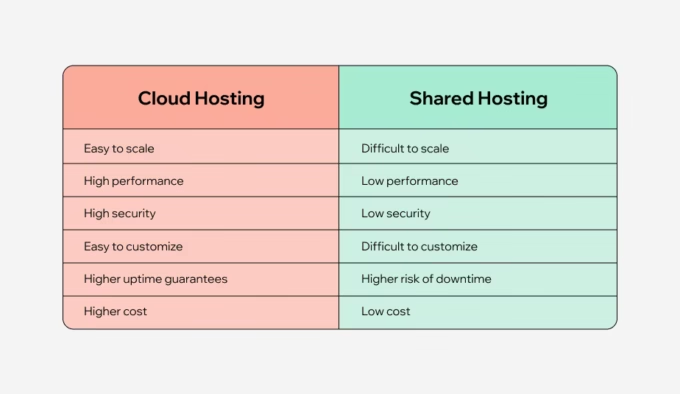
Your hosting service plays a key role in speed. Shared hosting or old servers often cause delays. Better hosting offers faster processors, more memory, and less crowded servers. This means your website loads quickly and works smoothly for all users.
Limited Storage Space
Signs you’re running out of storage include frequent error messages and slow uploads. Your website may stop accepting new files or images. Visitors might see incomplete pages or broken links.
The impact on website functionality can be serious. Pages load slower, causing visitors to leave. E-commerce sites may fail to process orders. Backups might not complete, risking data loss.
| Storage Expansion Options | Description |
|---|---|
| Upgrade Hosting Plan | Choose a plan with more storage and bandwidth. |
| Use Cloud Storage | Store files offsite to free up server space. |
| Clean Up Files | Delete unused files and optimize images regularly. |
Handling Increased Traffic
Traffic spikes can cause your website to crash unexpectedly. This disrupts user experience and hurts your reputation. Many hosts have scalability limits, meaning they cannot handle sudden growth well. This can lead to slow loading times or downtime.
Upgrading for growth means choosing a host that scales with your needs. A good host adjusts resources automatically during high traffic. This keeps your site running smoothly without interruptions. Not upgrading can cause lost visitors and sales.
Poor Customer Support
Slow response times frustrate users and delay problem solving. Waiting hours or days for answers is common with poor hosting support.
Technical expertise matters. Support staff who cannot explain issues or provide clear help cause confusion and errors.
Limited support channels reduce options. Only email or ticket systems make urgent issues harder to fix quickly.
| Support Aspect | What to Watch For |
|---|---|
| Response Time | Long waits; slow replies; no live chat |
| Technical Expertise | Inability to solve basic problems; vague answers |
| Availability | Limited hours; no 24/7 support |
| Support Channels | Only email or ticket; no phone or chat |
Security Vulnerabilities
Frequent security issues can harm your website and users. Weak hosting often means vulnerabilities like malware or hacking attempts. Missing an SSL certificate puts your visitors’ data at risk. Many hosts also lack regular backups, making recovery hard after attacks.
Protecting your website needs a strong host with security measures. Look for automatic backups and SSL support. A secure host keeps hackers out and your data safe. Avoid hosts that often face security breaches or delays in fixing them.
Server Error Messages
Common error types include 404 Not Found, 500 Internal Server Error, and 503 Service Unavailable. These errors often show when a website fails to load properly.
Causes behind errors can be many. Server overload, incorrect coding, or expired hosting plans often lead to these messages. Sometimes, too much traffic or poor server management causes errors.
Steps to resolve involve checking server status and error logs. Clearing cache or updating software may help. Contacting your hosting provider is also a good step. Upgrading to better hosting can reduce these errors and improve website speed and reliability.

Credit: www.lightwavenetworks.com
Limited Hosting Features
Missing essential tools can limit your website’s growth. Features like automatic backups, SSL certificates, and easy control panels are critical. Without these, managing your site becomes hard and risky.
Compatibility issues occur if your hosting does not support popular software or scripts. This can cause errors or prevent your site from running properly. Check if your host supports the latest PHP versions, databases, and CMS platforms.
Plans with more features offer better security, faster loading times, and improved scalability. They often include 24/7 support and tools that help keep your site safe and online.
Slow Admin Dashboard
The slow admin dashboard can make managing your site frustrating. Tasks take longer, reducing your productivity and causing delays. This often means your hosting is not handling backend processes well.
Signs include lagging menu responses, delays in loading pages, and slow plugin updates. These issues can make simple changes difficult and slow.
Diagnosing slowness starts with checking your server resources like CPU and memory usage. Also, review the number of active plugins and their impact. Sometimes, the hosting provider’s server speed or location causes delays.
Improving performance might involve upgrading to a plan with better hardware, optimizing databases, or using caching tools. Switching to a host with faster servers often helps.

Credit: www.ethernetservers.com
How Our Company Can Help You with Signs You Need Better Hosting
Learning from Hosting Challenges
Recognizing the signs that you need better hosting, such as frequent downtime or slow loading speeds, opens the door to valuable learning opportunities. Understanding how these issues impact your website’s performance can help you make more informed decisions about your hosting needs.
For instance, exploring how limited storage space affects your site’s growth or how poor customer support can delay crucial fixes will deepen your grasp of hosting essentials. HostingAdvise’s balanced, evidence-based reviews and guides offer practical insights that align with these concerns, helping beginners and developers alike navigate complex choices.
- Analyze your current hosting’s ability to handle increased traffic
- Research security measures to prevent vulnerabilities
- Evaluate the features that support your website’s long-term goals
Approaching hosting decisions with this mindset not only enhances your technical knowledge but also builds confidence in selecting solutions that suit your unique needs. If you have questions or want to discuss specific issues, reaching out to knowledgeable communities or support channels can provide personalized guidance without any pressure.
Frequently Asked Questions
What Are The 4 Types Of Hosting?
The four types of hosting are shared, VPS, dedicated, and cloud hosting. Each offers different performance and control levels.
Why Is Hosting So Important?
Hosting ensures your website loads quickly, stays online, and remains secure, directly impacting user experience and search rankings.
How Much Is 1 Year Hosting?
The cost of 1-year hosting typically ranges from $30 to $200, depending on the provider and plan features. Basic plans are cheaper, while advanced options with more storage and speed cost more. Always compare pricing and features before purchasing.
What To Look For In A Hosting Provider?
Choose a hosting provider with high uptime, fast loading speed, strong security, sufficient storage, and responsive customer support.
Conclusion
Choosing the right hosting matters for your website’s success. Slow speeds, frequent downtime, and lack of space all hurt user experience. Your visitors expect fast and reliable access every time. Don’t let poor hosting hold your site back. Upgrading can improve performance and keep your audience happy.
Pay attention to these signs before problems grow. A better host supports your growth and security needs. Take action now to ensure your website runs smoothly and stays online.













Leave a comment