


Looking to build a website for your nonprofit but feeling overwhelmed by all the options? You’re not alone.
Choosing the best website builder can make or break how effectively you connect with supporters, share your mission, and raise funds. The right platform will save you time, cut costs, and give you powerful tools designed specifically for nonprofits like yours.
In this guide, you’ll discover straightforward, budget-friendly website builders that are easy to use—even if you have no coding skills. Keep reading to find the perfect fit that will help your nonprofit shine online and grow your impact.
Top Website Builders For Nonprofits
WordPress gives nonprofits full control and growth options. It has many plugins for donations, events, and more. You can customize everything. Ideal for groups wanting ownership of their site and data. It may need some technical help.
Squarespace shines with its beautiful templates. Perfect to tell your nonprofit’s story with photos and videos. It offers easy tools for donation collection and event ticket sales. Great for a professional look without much fuss.
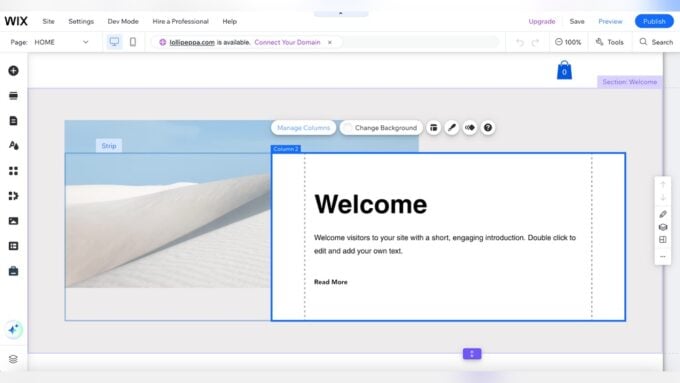
Wix is very easy to use. Drag-and-drop tools let beginners build and update sites fast. It has templates made for nonprofits and supports mobile devices. A good choice for those new to website building.
Zeffy focuses on donations. It provides a simple, free platform to collect funds online. No need to build a full website. Ideal for groups wanting to start fundraising quickly and without cost.

Credit: www.jim.com
Budget-friendly Options
Many free and low-cost website builders help nonprofits start easily. Platforms like Wix and Weebly offer free plans with basic features. These plans suit small groups with simple needs. For more options, low-cost plans under $10 per month add extra tools and remove ads.
Several builders give discounts or special nonprofit offers. Wix and Squarespace, for example, provide reduced prices to registered charities. These deals make it easier to afford better features like donation buttons and event pages.
Balancing cost and features is important. Free plans save money but limit customization. Paid plans cost more but offer better design options, storage space, and support. Choose a builder that fits your budget and needs without overspending.
Key Features For Nonprofit Sites
Donation and fundraising tools help nonprofits collect money easily. These tools support one-time and recurring donations. They also allow event ticket sales and donor management.
Mobile responsiveness means the website looks good on phones and tablets. Most people use mobile devices to browse. A responsive site improves user experience and keeps visitors engaged.
Ease of use and editing lets you update the site without technical skills. Simple drag-and-drop editors and clear menus save time. Quick changes help keep content fresh and relevant.
Integration with social media connects your site to platforms like Facebook and Twitter. Sharing news and events becomes easier. It helps increase visibility and reach more supporters.
Design And Customization
Template quality and variety are key for nonprofit websites. Good templates look professional and clean. They should fit many causes and styles. Templates that work well on phones and tablets are essential. Having multiple designs helps nonprofits find the perfect match for their mission.
Flexibility with plugins and add-ons allows nonprofits to add features like donation forms, event calendars, and volunteer sign-ups. Easy-to-install plugins save time and effort. This flexibility improves site function without complex coding.
Branding consistency means keeping colors, logos, and fonts the same across the site. This builds trust and makes the organization look professional and reliable. A good website builder lets you control these details easily.
Technical Considerations
Proprietary builders offer easy setup and support but limit customization. Open source builders allow full control and flexibility but need technical skills. Choose based on your team’s experience and needs.
Scalability means your website can grow with your nonprofit. Look for builders that let you add pages, features, and handle more visitors without slowdowns. This helps avoid costly migrations later.
| Aspect | Key Points |
|---|---|
| Security | Strong passwords, SSL certificates, and regular updates keep data safe. |
| Data Protection | Ensure compliance with laws like GDPR. Protect donor information carefully. |

Credit: www.tooltester.com
Building And Managing Your Site
Drag-and-drop editing tools make website building simple. You can move elements around without coding. This helps create a unique site fast. Many builders offer pre-made templates designed for nonprofits.
Content management is easy with clear menus and simple dashboards. You can add text, images, and videos quickly. Keeping the website up to date is important for sharing news and events.
Support and community resources provide help when needed. Many platforms have forums where users share tips. Customer support teams answer questions by chat or email. These resources save time and reduce frustration.
Tips For Boosting Impact
Storytelling helps donors connect with your cause. Use simple, clear stories about people or projects your nonprofit supports. Show how donations make a real difference. Include photos and videos to make stories more engaging.
To improve your website’s reach, focus on search engine optimization (SEO). Use keywords that donors might type, like “help children” or “support clean water.” Make sure your website loads fast and works well on phones. Add clear titles and descriptions to each page.
Using analytics lets you see what visitors like. Check which pages get the most visits and which ones lose people. Use this data to make your website better. Try changing words or pictures to keep visitors interested longer and encourage donations.

Credit: www.wpbeaverbuilder.com
How Our Company Can Help You with Best Website Builder for Nonprofit
Learning Through Building: Enhancing Your Nonprofit Website Skills
Choosing the best website builder for your nonprofit is just the beginning. As you explore budget-friendly options and key features for nonprofit sites, consider this a practical learning opportunity. Experimenting with design and customization tools helps develop your digital skills, empowering you to create a site that genuinely resonates with your mission.
Managing your website offers hands-on experience with technical considerations such as mobile responsiveness and SEO essentials—areas HostingAdvise emphasizes through research-backed guidance. By navigating these elements, you not only build a functional online presence but also deepen your understanding of how to boost your nonprofit’s impact effectively.
- Test different templates to see what aligns best with your audience
- Practice updating content regularly to maintain engagement
- Explore SEO basics to increase your site’s visibility
For further support, resources like HostingAdvise provide balanced insights and verified user feedback, helping beginners gain confidence. If you have questions along the way, reaching out to such expert platforms can offer clarity without pressure.
Frequently Asked Questions
What Is The 33% Rule For Nonprofits?
The 33% rule for nonprofits suggests spending no more than 33% of funds on administrative and fundraising costs. This ensures most donations directly support the mission. Nonprofits use this guideline to maintain financial transparency and build donor trust.
What Is The Best Website For Non-profit Organizations?
The best website for nonprofits depends on needs: Squarespace offers elegant design, Wix provides user-friendly control, and WordPress ensures scalability. Zeffy suits donation-focused sites with free fundraising tools.
Is Wix Free For Nonprofits?
Wix offers free plans but does not provide a specific free plan exclusively for nonprofits. Discounts may apply.
Is Wix Good For Non-profit?
Wix suits nonprofits with easy drag-and-drop design and nonprofit-specific templates. It supports donations and mobile-friendly sites.
Conclusion
Choosing the right website builder helps your nonprofit grow and connect. Focus on ease of use and donation features. A simple, clear site engages visitors and boosts support. Consider your budget and future needs carefully. The best builder fits your mission and goals perfectly.
Start building a strong online presence today.





Leave a comment