


Ready to get your website online but not sure where to start? Hosting a website might sound tricky, but it doesn’t have to be.
Whether you want to share your ideas, showcase your portfolio, or launch a business, understanding how to host your website is the first step. In this complete guide for beginners, you’ll discover simple, clear steps to get your site live without confusion.
By the time you finish reading, you’ll have the confidence to choose the right hosting option and make your website accessible to the world. Let’s dive in and make your online presence a reality!

Credit: razorhost.com
Choosing A Hosting Provider
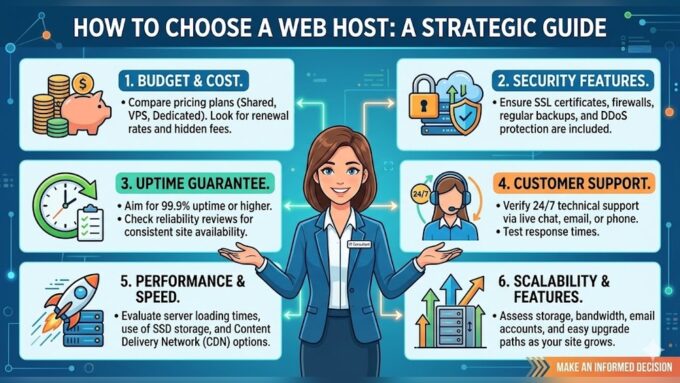
Choosing the right hosting provider is a key step in getting your website online. The provider stores your website files and delivers them to visitors. Picking a good host ensures your site runs smoothly and stays online all the time. Many options exist, so understanding the differences can help you decide.
Types Of Hosting Services
Shared hosting is the most affordable and easy to use. You share server space with other websites. It works well for small sites or beginners. VPS hosting offers more power and control. It splits a server into virtual parts just for you. Dedicated hosting means you get a whole server alone. This is best for large websites with high traffic. Cloud hosting uses multiple servers to keep your site online. It scales resources up or down as needed.
Comparing Popular Providers
Providers like Bluehost, SiteGround, and HostGator are popular choices. They offer shared, VPS, and dedicated plans. Look for good customer service and uptime guarantees. Some hosts include free domain names or SSL certificates. Others have easy website builders or one-click installs for WordPress. Prices and features vary, so compare what fits your needs and budget. Reading user reviews can help you find reliable hosts.
Key Features To Consider
Check the storage space and bandwidth limits. These affect how much content your site can hold and how many visitors it can handle. Look for a provider with strong security measures like SSL and backups. Fast loading speeds improve user experience and SEO. Easy control panels help manage your site without technical skills. Also, consider the level of customer support available. 24/7 support is ideal in case problems arise.
Selecting The Right Hosting Plan
Selecting the right hosting plan is the first big step to get your website online. The choice affects your site’s speed, security, and growth potential. Understanding the types of hosting helps you pick the best option for your needs. This guide breaks down key hosting plans and what they offer.
Shared Vs Vps Vs Dedicated Hosting
Shared hosting means your website shares a server with many others. It is the cheapest option and easy to use. But, shared resources can slow your site during high traffic times.
VPS (Virtual Private Server) hosting offers more power and control. Your website still shares a server but has its own dedicated space. VPS is good for growing websites that need better speed and security.
Dedicated hosting gives you a whole server just for your website. It offers the best performance and full control. This option is best for large websites with heavy traffic and special needs.
Managed Vs Unmanaged Hosting
Managed hosting means the provider handles all technical tasks. They update software, fix issues, and secure your server. This saves time and effort, especially for beginners.
Unmanaged hosting requires you to manage all server tasks. You must install updates and troubleshoot problems. This option is cheaper but needs more technical knowledge.
Budgeting For Hosting Costs
Hosting prices vary widely depending on the plan and features. Shared hosting can cost as little as a few dollars per month.
VPS and dedicated hosting usually cost more, starting from $20 to hundreds of dollars monthly. Managed hosting tends to be pricier than unmanaged plans.
Consider your website’s needs and growth plans. Choose a plan that fits your budget and offers room to grow.
Registering Your Domain Name
Registering your domain name is the first step to making your website live. It gives your site a unique address on the internet. This address helps visitors find your website easily. Choosing the right domain name is important because it represents your brand and identity online.
After picking a domain, you will need to register it. The registration process is simple but must be done carefully to avoid issues later. Once registered, you connect your domain to your hosting provider. This connection allows your website files to display when someone types your domain name.
Picking A Memorable Domain
Choose a domain name that is easy to remember and spell. Keep it short and simple. Avoid using numbers or hyphens, as they can confuse visitors. Use keywords related to your website to help with search engines. Check if the domain name is available using online tools. Make sure it fits your brand and purpose well.
Domain Registration Process
Start by selecting a domain registrar. This is a company that sells domain names. Popular registrars include GoDaddy, Namecheap, and Google Domains. Create an account with your chosen registrar. Search for your desired domain to check availability. If available, add it to your cart and proceed to checkout. Provide your contact details during registration. Pay the registration fee, usually yearly. You will receive a confirmation email with details.
Connecting Domain To Hosting
After registering your domain, you need to link it to your hosting account. Locate the nameservers in your hosting control panel. These are special addresses that point your domain to your hosting server. Go back to your domain registrar account. Find the DNS settings or nameserver settings. Replace the default nameservers with those from your hosting provider. Save the changes. It may take a few hours to a day to update worldwide. Once done, your domain will show your website content.

Credit: www.inmotionhosting.com
Setting Up Your Website Files
Setting up your website files is a key step in getting your site online. This process involves transferring your website content from your computer to your hosting server. Once uploaded, your site becomes visible to visitors worldwide. The method you choose depends on your site’s type and your comfort with technical tools.
Uploading Files Via Ftp
FTP stands for File Transfer Protocol. It is a simple way to move files from your computer to your web host. You use an FTP client like FileZilla or Cyberduck. Connect to your hosting server using the login details provided by your host. Then drag and drop your website files into the correct folder, usually named public_html or www. This method suits those who work directly with HTML, CSS, and JavaScript files.
Using A Website Builder
Website builders are tools that simplify website creation. They come with drag-and-drop features and templates. Many hosting providers offer built-in builders or integrate with popular ones like Wix or Squarespace. Using a builder means you do not handle files manually. Instead, you design your site visually, and the platform manages the files behind the scenes. This option fits beginners or those who prefer a faster setup without coding.
Deploying Static Vs Dynamic Sites
Static sites consist of fixed files like HTML, CSS, and images. These files do not change unless updated manually. They are easy to upload and fast to load. Dynamic sites use server-side scripts like PHP or databases to create pages on the fly. These sites need special hosting that supports scripting and databases. Your site type affects how you upload and manage files. Choose hosting that matches your site’s needs for smooth performance.
Configuring Website Settings
Configuring your website settings is a key step after hosting your site. This process ensures your website runs securely and smoothly. It also helps your visitors have a good experience when they visit your pages. Simple settings can protect your site and make managing it easier.
Here are important settings to focus on: SSL certificates, email accounts, and DNS records. These keep your site safe, allow communication, and guide visitors to your site correctly.
Setting Up Ssl Certificates
SSL certificates secure your website by encrypting data. They protect information visitors send, like passwords or payment details. Most web hosts offer free SSL certificates. You can activate one from your hosting control panel. After setup, your website address will start with https://. This shows visitors your site is safe.
Without SSL, browsers may warn users that your site is insecure. This can reduce visitor trust and traffic. Renew your SSL certificate before it expires to keep protection active.
Creating Email Accounts
Your hosting service often allows you to create email accounts using your domain name. For example, info@yourdomain.com. This looks professional and builds trust with visitors. You can manage emails through webmail or connect them to apps like Outlook or Gmail.
Set up strong passwords for each email account. Check your hosting control panel for options to create and manage email addresses. Regularly clean your inbox to keep email running smoothly.
Managing Dns Records
DNS records control how your domain name connects to your website and email. Common types include A records, CNAME, MX, and TXT records. A records link your domain to your website’s IP address. MX records tell the internet where to deliver your emails.
Access your DNS settings in your hosting or domain registrar panel. Make changes carefully to avoid breaking your site or email. You may need to wait a few hours for DNS changes to take effect. Use online tools to check your DNS status and troubleshoot any issues.
Launching Your Website
Launching your website is an exciting step in your online journey. It means your site is ready for visitors worldwide. Before sharing your site, ensure everything works smoothly. Test every feature to give users a great experience. Be ready to fix issues quickly to keep your site running well. Promoting your site helps attract visitors and grow your audience. Use simple, effective methods to spread the word about your new site.
Testing Website Functionality
Check all links to make sure they lead to the right pages. Test forms to see if they send messages correctly. Look at your site on different devices like phones and tablets. Ensure images load fast and appear correctly. Try your website in different browsers such as Chrome, Firefox, and Safari. Fix any errors you find before launching to the public.
Troubleshooting Common Issues
Slow loading times can turn visitors away. Use tools to check your site speed and optimize images. Broken links confuse users and hurt SEO. Regularly scan your site to find and fix them. Sometimes, plugins or themes cause conflicts—disable them one by one to spot problems. Clear your browser cache to see recent changes properly. Keep backups to restore your site if something goes wrong.
Promoting Your Site Online
Share your website on social media platforms to reach friends and followers. Create useful content that others want to read and share. Join online groups related to your website topic and participate actively. Register your site with search engines like Google to improve visibility. Use email newsletters to keep visitors informed about updates. Consistent promotion helps your website grow over time.
Maintaining Your Website
Maintaining your website is essential for keeping it safe, fast, and reliable. A well-maintained website attracts more visitors and improves their experience. Regular care helps avoid problems that could disrupt your site. This section guides you on key steps to maintain your website effectively.
Regular Backups And Updates
Backing up your website regularly protects your data from loss. Save copies of your files and databases often. Updates fix bugs and improve security. Update your website software, themes, and plugins as soon as new versions are available. This keeps your site running smoothly and safely.
Monitoring Performance And Security
Check your website speed and uptime to ensure good performance. Use tools to track loading times and server status. Watch for security threats like malware or hacking attempts. Install security plugins and enable firewalls. Regular scans help detect problems early and keep your site secure.
Scaling Hosting As Traffic Grows
As more people visit your site, your hosting needs may increase. Monitor your traffic and server load regularly. Upgrade your hosting plan if your site becomes slow or crashes. Consider options like VPS or cloud hosting for better resources. Scaling your hosting keeps your site stable and responsive for visitors.
Credit: www.wpcrafter.com
How Our Company Can Help You with How to Host a Website a Complete Guide for Beginners
When diving into hosting your first website, practical experience can solidify your understanding of key steps like choosing a hosting provider and setting up your website files. Experimenting with different hosting plans, for instance, helps you grasp the balance between cost and resources—a crucial insight for beginners. Similarly, working hands-on with domain registration and configuring website settings offers a clearer picture of how these elements interact to get your site online. At HostingAdvise, we emphasize evidence-based guidance drawn from official documentation and real user feedback, which can be a valuable reference as you explore these processes. If you run into challenges or want to deepen your knowledge, reaching out to knowledgeable communities or support teams can be a helpful next step. Remember, maintaining your website is an ongoing journey, and each practical step you take builds confidence and skill for managing your online presence effectively.
Frequently Asked Questions
How To Host A Website Step By Step Guide?
Choose a web hosting provider and plan. Register or connect your domain. Upload your website files via a control panel or FTP. Configure settings and launch your site. Test to ensure it works properly online.
What Are The 7 C’s Of A Website?
The 7 C’s of a website are: Context, Content, Community, Customization, Communication, Connection, and Commerce. They ensure user engagement and site effectiveness.
What Is The Simplest Way To Host A Website?
The simplest way to host a website is by using a no-code website builder like Wix or Squarespace. They offer easy design tools and hosting plans combined.
How To Build A Website Beginners Guide?
Start by choosing a website builder or CMS. Pick a domain name and hosting plan. Design your site with templates and add essential pages. Publish and maintain your website regularly for best results.
Conclusion
Hosting a website is easier than it seems at first glance. Choose a hosting provider that fits your needs and budget. Register your domain name to make your site unique. Upload your website files using simple tools or platforms. Test your site to ensure everything works well online.
Keep learning and updating your site to reach more visitors. With patience and practice, your website will grow. Start small, stay consistent, and enjoy the process. Your online presence is now within your control.












Leave a comment