




Thinking about starting your own web hosting business? You’re about to enter a market that powers the internet itself — and that means huge potential.
But where do you begin? What do you need to set up, and how can you stand out from the crowd? This guide will walk you through every essential step, from choosing the right server to building a brand customers trust.


By the time you finish reading, you’ll know exactly how to launch a web hosting company that’s built for success — without getting overwhelmed by tech jargon or costly mistakes. Ready to turn your ideas into a thriving web hosting business? Let’s dive in.
Choosing Your Hosting Model
Choosing the right hosting model is key to starting a web hosting business. It shapes your services, costs, and customer experience. Picking a model depends on your technical skills, budget, and business goals. This section explains popular hosting models to help you decide.
Reseller Hosting Basics
Reseller hosting lets you sell hosting without owning servers. You buy space from a larger provider and resell it. The main provider manages servers and technical tasks. You focus on customer service and sales. This model suits beginners or those with less technical knowledge.
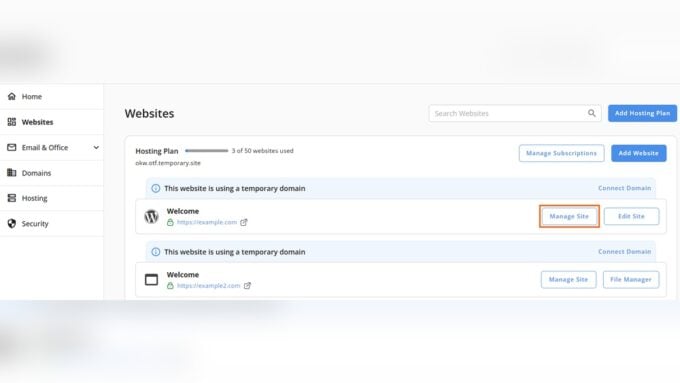
Reseller accounts come with control panels to manage client accounts. You set your prices and package features. It requires low initial investment and less risk. It’s easy to start and scale. But you depend on the main host for uptime and performance.
Leasing Vps Or Dedicated Servers
Leasing a Virtual Private Server (VPS) or a dedicated server means more control. You rent a whole server or part of it from a data center. You manage server setup, security, and updates. This model suits those with technical skills or a team to handle servers.
VPS offers shared resources but with dedicated portions. Dedicated servers give full resources to you alone. This allows customization and better performance. It also means higher costs and responsibilities. You can offer different plans with varied resources.
Pros And Cons Of Each Model
Reseller hosting is simple and cheap to start. Less technical work and fast setup are big pluses. But you have limited control and depend on the main host. Profit margins can be lower because you pay for reselling.
VPS or dedicated servers provide full control and higher earnings. You can customize services and improve client experience. The downside is more technical work and higher costs. Server management mistakes can affect your clients directly.

Credit: www.inmotionhosting.com
Setting Up Server Infrastructure
Setting up the server infrastructure is the backbone of your web hosting business. It requires careful planning to provide reliable and fast hosting services. The server setup affects your customers’ website speed, uptime, and security.
Choose the right server locations, configure essential software, and secure your servers. These steps build a strong foundation for your hosting company.
Selecting Server Locations
Choose server locations near your target audience. This reduces latency and improves website loading times. Many data centers offer global options. Pick locations with strong network connections and good power backup. Consider places with low risk of natural disasters. Server proximity helps deliver better user experience and attracts more customers.
Configuring Whm And Cpanel
WHM and cPanel simplify server management and client control. WHM allows you to create and manage multiple cPanel accounts easily. This helps divide server resources for different customers. Install the latest versions for security and features. Customize settings to match your hosting plans. Provide clients with easy-to-use control panels. This improves customer satisfaction and reduces support requests.
Ensuring Server Security
Secure servers to protect data and maintain uptime. Use firewalls to block unwanted traffic. Enable automatic updates to patch vulnerabilities quickly. Install SSL certificates to encrypt data transfers. Monitor servers regularly for suspicious activity. Set strong passwords and limit access to trusted users only. Backup data frequently to avoid loss. Good security builds trust and keeps your hosting business safe.
Automation And Billing Systems
Automation and billing systems form the backbone of any web hosting business. These systems save time and reduce errors by handling routine tasks. They help manage customer accounts, process payments, and track support requests seamlessly. Setting up reliable automation and billing tools improves customer satisfaction and business efficiency.
Using Whmcs Or Blesta
WHMCS and Blesta are popular billing and automation platforms. Both integrate with web hosting control panels like cPanel and Plesk. They allow you to sell hosting plans, manage subscriptions, and automate renewals. These platforms also support payment gateways such as PayPal and Stripe. Choosing either tool depends on your budget and specific business needs.
Automating Account Provisioning
Automating account provisioning means new hosting accounts create themselves after purchase. The system sets up client hosting without manual work. This speeds up service delivery and reduces errors. WHMCS and Blesta can link to your server control panel for instant account creation. Automation frees up your time to focus on growing the business.
Managing Invoices And Support Tickets
Billing software tracks invoices, payments, and overdue accounts automatically. It sends reminders to customers for upcoming or late payments. This reduces the chance of lost revenue. Support ticket management lets clients report issues easily. Your team can respond quickly and keep records organized. Integrating billing with support improves customer experience and retention.
Designing Hosting Packages
Designing hosting packages is a crucial step in starting a web hosting business. It shapes how customers see your service and what they get for their money. Clear, simple packages help attract and keep clients. Focus on what users need most and tailor your offers accordingly.
Think about the resources customers require. The right balance between features and price makes your plans competitive. Offer options to suit beginners and advanced users. This flexibility builds trust and grows your client base over time.
Defining Bandwidth And Storage Limits
Bandwidth measures the data your customer’s website can transfer monthly. Set limits that cover typical usage but avoid overloading your server. Storage is the space for website files, emails, and databases. Offer enough storage for small to medium sites initially.
Consider offering unlimited bandwidth with fair usage policies for higher plans. Clearly state limits to prevent surprises. Adjust limits based on customer feedback and server capacity. This clarity helps customers choose the right plan confidently.
Including Ssl And Security Features
SSL certificates protect data between websites and users. Include free SSL in all packages to boost security and trust. Add features like malware scanning and firewalls for extra protection. Security is a top priority for website owners.
Regularly update security tools to keep threats at bay. Highlight these features in your marketing to show your commitment to safety. Customers appreciate clear information on how you protect their sites.
Creating Tiered Pricing Plans
Tiered plans give customers choices based on their needs and budgets. Create at least three levels: basic, standard, and premium. The basic plan covers essential features at a low cost. Standard includes more resources and extras. Premium offers maximum performance and support.
Price plans competitively but ensure profit margins. Use simple names and descriptions to avoid confusion. Offering upgrades and add-ons keeps customers engaged and willing to spend more. Transparent pricing builds trust and reduces cancellations.
Building Your Brand
Building your brand is a crucial step in starting a web hosting business. It shapes how customers see your company and sets you apart from competitors. A strong brand creates trust and helps attract loyal clients.
Every detail counts, from your business name to your logo. These elements work together to make your company memorable and professional. Focus on simple, clear, and consistent branding to build a solid reputation.
Choosing A Memorable Business Name
Pick a business name that is easy to remember and spell. Avoid long or complex words that confuse customers. The name should reflect your service and sound professional. Use keywords related to web hosting to improve search engine visibility. Check that the name is unique to prevent legal issues and domain conflicts.
Registering A Domain And Website Setup
Secure a domain that matches your business name closely. Choose a .com domain for better credibility and recognition. Set up a website with clear navigation and fast loading times. Use WordPress or similar platforms for easy management. Highlight your hosting plans and features prominently. Add contact information and support options to build trust.
Designing A Professional Logo
Create a logo that is simple and easy to recognize. Use colors that convey trust and professionalism, like blue or green. Avoid overly complex designs that lose clarity at small sizes. Hire a designer or use logo makers for quality results. Ensure your logo looks good on your website, social media, and marketing materials.

Credit: www.greengeeks.com
Legal And Administrative Steps
Starting a web hosting business involves more than just technical setup. Legal and administrative steps protect your company and build trust with customers. These steps ensure your business operates smoothly and follows the law.
Proper legal documents and registrations prevent future disputes. They also help you manage your business efficiently. Below are key actions to take before launching your hosting service.
Registering Your Business Entity
Choose a business structure like an LLC, corporation, or sole proprietorship. Register your business with state and local authorities. This process makes your company official and separate from you.
Registering protects your personal assets and adds credibility. It allows you to open business bank accounts and apply for loans. Each structure has different tax and legal benefits. Consider consulting a professional for the best option.
Drafting Terms Of Service And Privacy Policies
Create clear Terms of Service (ToS) to explain your hosting rules. Include payment terms, account suspension policies, and acceptable use rules. This document sets client expectations and limits your liability.
Privacy policies show how you collect and protect customer data. They are legally required in many places. Use simple language so customers understand their rights. Regularly update these documents to stay compliant with laws.
Obtaining Necessary Licenses And Tax Ids
Check local and state requirements for business licenses or permits. Some regions require specific licenses for online services. Obtain a federal Employer Identification Number (EIN) for tax purposes.
The EIN is used to file taxes and hire employees. Register for state tax IDs if you will collect sales tax. Keeping your licenses and tax IDs current avoids penalties and fines.
Marketing And Client Acquisition
Marketing and client acquisition form the backbone of your web hosting business. Without effective marketing, attracting customers becomes difficult. Finding and keeping clients requires clear strategies and consistent effort.
Focus on reaching the right audience. Understand their needs and tailor your services to fit them. Building trust and offering value help convert prospects into loyal customers.
Targeting Specific Niches
Choose a niche that fits your strengths and market demand. Serving a specific group, like local businesses or bloggers, reduces competition. It allows you to create personalized packages that meet their unique needs.
Niches often have specialized requirements. Customize your hosting plans and support to solve their problems. This approach makes your service more attractive and builds customer loyalty.
Pricing Strategies Beyond Competing On Cost
Avoid lowering prices to attract clients only. Competing on cost can hurt profits and brand value. Instead, focus on offering clear benefits and quality service.
Use tiered pricing with different features to appeal to various clients. Offer add-ons like extra storage or enhanced security for higher tiers. This creates value while keeping your base price competitive.
Building Customer Relationships
Strong relationships lead to repeat business and referrals. Communicate regularly and respond quickly to client needs. Provide helpful resources like tutorials and FAQs.
Show appreciation with small gestures, such as discounts for long-term customers. Listen to feedback and improve your service based on it. Happy clients become your best promoters.
Providing Customer Support
Providing excellent customer support is essential for a successful web hosting business. It builds trust and keeps clients satisfied. Quick, clear help reduces frustration and keeps customers loyal. Support services must be easy to use and available around the clock. This section covers key ways to provide strong customer support.
Setting Up A Ticketing System
A ticketing system helps manage client requests efficiently. Each client issue creates a ticket that tracks progress until resolved. This keeps communication organized and prevents requests from being lost. Choose software that integrates with billing and account management. Automation features can assign tickets to the right team member. Fast responses improve client satisfaction and reduce churn.
Creating A Knowledge Base
A knowledge base allows clients to find answers on their own. It saves time for both clients and support staff. Include clear guides on common topics like setting up email or managing domains. Use simple language and step-by-step instructions. Regularly update the knowledge base with new solutions and FAQs. A well-maintained knowledge base builds client confidence and reduces support tickets.
Handling Client Onboarding
Onboarding is the first chance to impress new clients. Provide clear instructions on how to start using hosting services. Send welcome emails with login details and helpful links. Offer tutorials or webinars to walk clients through key features. Respond quickly to onboarding questions to avoid confusion. Good onboarding reduces support calls and increases client retention.
Scaling Your Hosting Business
Growing your web hosting business requires smart steps to handle more clients and increase profits. Scaling means improving your infrastructure and services to meet higher demand. It involves more than just selling more plans. You must upgrade your servers, add new offerings, and manage support efficiently. These actions help keep your customers happy and your business stable.
Upgrading Server Resources
Start by increasing your server capacity. Add more RAM, CPU power, and storage space. Faster servers improve website loading times. This attracts and retains customers. Consider moving from shared to dedicated servers as you grow. Use scalable cloud hosting solutions for flexibility. Monitor server performance regularly to avoid downtime. Good hardware is the backbone of your hosting business.
Expanding Service Offerings
Offer more than basic hosting plans. Add services like domain registration, SSL certificates, and website builders. Include managed hosting for clients who need help. Provide email hosting and backup solutions. Bundling services creates value and boosts sales. Keep an eye on market trends to add in-demand features. Diverse offerings attract different customer types and increase revenue streams.
Outsourcing Support And Maintenance
As your client base grows, support demands rise. Hire external teams for technical support and server maintenance. Outsourcing reduces your workload and improves response times. Choose reliable partners with good customer service skills. Use ticketing software to track and manage client issues. Freeing up your time lets you focus on business growth. Efficient support keeps customers satisfied and loyal.

Credit: www.isitwp.com
How Our Company Can Help You with How to Start a Web Hosting Business
Practical Learning Opportunities in Launching Your Hosting Business
Starting a web hosting business involves more than just technical setup; it’s a continuous learning journey. For instance, gaining hands-on experience with setting up server infrastructure can deepen your understanding of performance optimization and security, which is crucial for delivering reliable service. Similarly, exploring automation and billing systems through platforms like WHMCS not only streamlines your operations but also teaches you about customer lifecycle management and payment workflows.
As you design hosting packages, consider experimenting with different configurations to see what resonates with your target audience. This aligns well with HostingAdvise’s mission to help beginners and businesses make confident choices based on balanced, evidence-based insights. Engaging with official documentation and verified user feedback can further enhance your practical knowledge.
If you have questions or want to discuss specific challenges, reaching out to communities or experts in Austin, Texas, or online can provide valuable support without any sales pressure. Remember, building a successful hosting business is as much about learning and adapting as it is about initial planning.
Frequently Asked Questions
What Are The First Steps To Start A Web Hosting Business?
Begin by renting a VPS or dedicated server to manage hosting. Choose backend software like WHM to create hosting accounts. Set up automation with WHMCS for billing and provisioning. Finally, brand your platform with a domain and website.
How Do I Choose The Right Hosting Plans To Offer?
Decide features based on client needs. Include monthly bandwidth, number of hosted websites, and SSL certificates. Offer tiered packages for different user types, such as basic shared hosting or advanced VPS plans, to attract a wider audience.
What Legal Steps Are Needed To Start Hosting Business?
Register your business officially, such as forming an LLC. Obtain a tax ID from local authorities. Draft clear Terms of Service and Privacy Policy to cover usage rules and uptime guarantees. These protect both you and your clients.
How Can I Provide Effective Customer Support?
Implement a reliable ticketing system to manage client requests efficiently. Create a self-service knowledge base to answer common questions. Good support reduces churn and builds trust, which is crucial for long-term success in web hosting.
Conclusion
Starting a web hosting business takes clear planning and steady work. Choose the right server and software to manage accounts easily. Create simple, fair packages that meet client needs. Set up strong customer support to build trust. Register your business and have clear policies in place.
Focus on offering good value, not just low prices. Stay patient and keep learning as you grow. Success comes with consistency and good service. Your hosting business can thrive with smart choices and care.












Leave a comment