


Choosing the right hosting for your website can feel overwhelming. You want something reliable, fast, and affordable—but how do you decide between shared hosting and cloud hosting?
If you’re just starting out or running a small site, shared hosting might seem like the obvious choice. But what if your site grows or needs better performance? Cloud hosting promises flexibility and power, but is it worth the extra cost?
You’ll discover the key differences between shared hosting and cloud hosting, what each means for your website’s speed, security, and control, and which option fits your needs best. Keep reading to make an informed decision that will help your website thrive.
Shared Hosting Basics
Shared hosting means your website shares one physical server with many others. All sites use the same server resources like memory and CPU. This setup keeps costs low but can limit speed if many sites use resources at once.
Common features include easy setup, a control panel for managing your site, and basic security tools. You usually get a set amount of storage and bandwidth. Support is available but may be limited due to shared resources.
Ideal users are beginners, small blogs, and small business websites with low traffic. It works well if you want a simple, affordable option without needing technical skills. Sites expecting rapid growth or heavy traffic may outgrow shared hosting quickly.
Cloud Hosting Basics
Cloud hosting works by using many servers together. These servers share the work of running websites. This means your site can use more power when needed. If one server has a problem, others keep your site online. This makes cloud hosting very reliable and fast.
Key advantages include easy scaling, strong uptime, and better speed. You pay only for the resources you use. No need to worry about traffic spikes slowing your site down. Cloud hosting also offers better security and flexibility compared to other hosting types.
Target audience for cloud hosting includes small businesses, growing websites, and online stores. It suits those who want their site to handle more visitors smoothly. People needing stable, fast, and flexible hosting prefer cloud hosting for their websites.
Performance Comparison
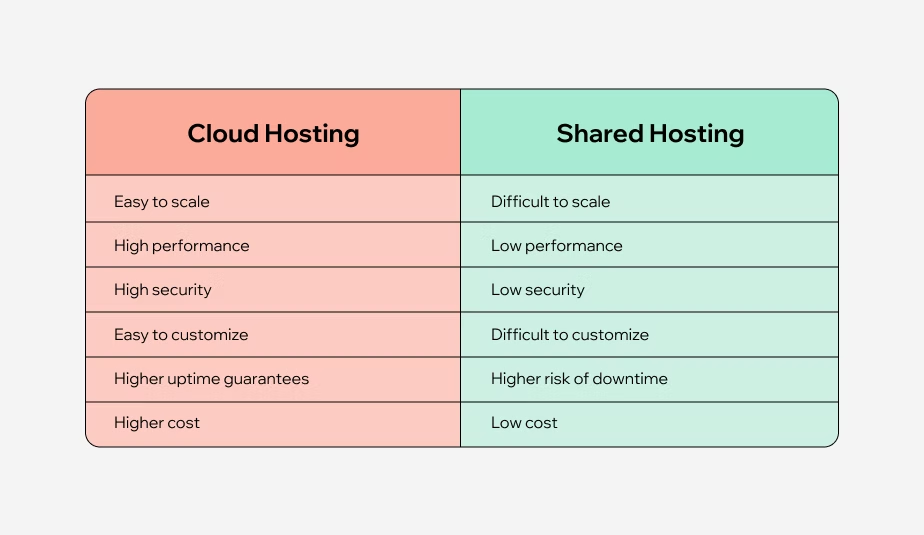
Shared hosting uses one server’s fixed resources for many websites. This means CPU, RAM, and disk space are shared, which can slow down performance if others use too much.
Cloud hosting uses multiple servers working together. Resources like CPU and memory are assigned dynamically, so your website gets what it needs. This improves speed and reliability.
| Feature | Shared Hosting | Cloud Hosting |
|---|---|---|
| Resource Allocation | Fixed, shared among many sites | Flexible, scales with demand |
| Handling Traffic Spikes | Often slows down or crashes | Handles spikes smoothly |
| Uptime and Reliability | Lower, affected by other sites | Higher, with backup servers |

Credit: www.cloudpanel.io
Cost Differences
Shared hosting usually charges a fixed monthly fee. You pay for a set amount of server space shared with others.
Cloud hosting uses a pay-as-you-go model. You pay for the actual resources your site uses.
Shared hosting is cheaper at first. It suits sites with low budgets and simple needs.
Cloud hosting costs can rise with traffic and resource use. But it offers more power and flexibility.
Value for money depends on your site’s size and needs.
Small sites get good value from shared hosting. Big or growing sites benefit more from cloud hosting.
| Aspect | Shared Hosting | Cloud Hosting |
|---|---|---|
| Pricing Model | Fixed monthly fee | Pay-as-you-go |
| Value for Money | Best for small sites | Better for scaling sites |
| Long-Term Expenses | Lower but less flexible | Higher but scalable |
Control And Customization
Access Levels differ greatly between shared and cloud hosting. Shared hosting offers limited access, usually no root or admin rights. This means users cannot fully control server settings. Cloud hosting provides higher access levels, often including root access. Users can manage their environments more freely.
Software Installation on shared hosting is restricted. Users can only install software allowed by the host. Cloud hosting allows installing almost any software. This flexibility helps run custom applications and tools.
Server Configuration is fixed in shared hosting. Users share the same server settings with others. Customization is very limited. Cloud hosting gives users the ability to change configurations. This helps optimize performance for specific needs.

Credit: www.wix.com
Scalability And Flexibility
Shared hosting offers limited scaling options. You must wait for the provider to upgrade resources. This makes it hard to handle sudden traffic jumps.
Cloud hosting provides flexible and quick scaling. You can add or remove CPU, RAM, and storage anytime. This helps match your site’s needs closely.
| Aspect | Shared Hosting | Cloud Hosting |
|---|---|---|
| Scaling Options | Fixed resources, slow upgrade | On-demand, instant upgrade |
| Resource Management | Shared with many users | Dedicated virtual resources |
| Adapting to Growth | Limited, may cause downtime | Smooth, no downtime |
Cloud hosting adapts well to growth. It allows websites to expand without issues. Shared hosting can slow down if traffic grows fast.
Security Considerations
Shared hosting poses several security risks. Since many sites share the same server, one site’s vulnerability can affect all others. Malware or hacking on one website might spread quickly. Limited control means users cannot fully protect their sites. Data breaches may happen more easily. Also, shared IP addresses can lead to blacklisting if another site misbehaves.
Cloud hosting offers stronger protections. It uses multiple servers, so if one fails, others keep the site safe. Resources are isolated, reducing risks from other users. Cloud systems often have built-in firewalls and automatic updates to fight threats. Data backups and quick recovery options help reduce downtime after attacks.
Best practices include using strong passwords, keeping software updated, and enabling two-factor authentication. Regularly scanning for malware and backing up data also help. Choosing a host with good security measures is important. Monitoring website activity can catch issues early. These steps protect websites on both shared and cloud hosting.
Technical Expertise Required
Shared hosting is very easy to use. It has simple management tools like control panels. These tools let users manage websites with just a few clicks. No deep technical skills are needed.
Cloud hosting offers more advanced tools. These tools help users control many servers at once. Some technical knowledge is helpful to use these tools well.
| Aspect | Shared Hosting | Cloud Hosting |
|---|---|---|
| Ease of Use | Very simple, good for beginners | More complex, needs some skills |
| Management Tools | Basic control panels like cPanel | Advanced dashboards, API access |
| Support Availability | Usually 24/7 support included | Support varies, often more technical |
Support teams for shared hosting help with common problems fast. Cloud hosting support can guide through more complex issues but may need more time.
Use Cases And Recommendations
Small websites and blogs do well with shared hosting. It is cost-effective and easy to manage. Resources like storage and bandwidth are shared with other sites. This can slow your site if others use many resources. Still, it is good for low traffic and simple sites.
Growing businesses benefit more from cloud hosting. Cloud hosting scales resources as traffic rises. It offers better uptime and speed. This means your website stays online even during traffic spikes. You get more control and flexibility than shared hosting.
High-traffic platforms need cloud hosting. It uses many servers working together. This setup handles large visitor numbers and complex apps. It keeps your website fast and reliable. Shared hosting cannot support heavy traffic well and may cause slowdowns or crashes.

Credit: www.bluehost.com
Popular Hosting Providers
Shared hosting leaders include providers like Bluehost, HostGator, and GoDaddy. They offer affordable plans perfect for small websites and blogs. Shared hosting means many sites share one server’s resources. This can cause slower speeds if traffic spikes.
Top cloud hosts such as Amazon Web Services (AWS), Google Cloud, and Microsoft Azure provide flexible and scalable solutions. Cloud hosting uses many servers working together. This setup helps handle high traffic and offers better uptime and performance.
Managed hosting options are available from providers like WP Engine and Kinsta. These services handle server maintenance, security, and updates for you. Managed hosting suits users who want to focus on content, not technical details.
How Our Company Can Help You with Shared Hosting Vs Cloud Hosting
Bridging Understanding with Practical Learning
Choosing between shared hosting and cloud hosting often comes down to understanding key factors like performance differences, scalability, and the level of control you need. For beginners or small businesses, exploring shared hosting basics can provide a solid foundation since it offers simplicity and cost-effectiveness. Meanwhile, learning about cloud hosting’s flexibility and enhanced performance helps those anticipating growth or requiring more customization to prepare accordingly.
To deepen your practical knowledge, consider hands-on experimentation with both hosting types. Setting up a small project on shared hosting can reveal limitations in control and resource allocation, while testing cloud hosting environments highlights its scalability and resilience. This approach aligns with HostingAdvise’s mission of helping readers choose hosting confidently by combining official documentation, independent research, and user feedback.
- Review performance comparisons to assess real-world impact.
- Understand security considerations to protect your site effectively.
- Evaluate technical expertise requirements before committing.
For further insights or specific questions, reaching out to hosting communities or experts can be invaluable. HostingAdvise also provides balanced, evidence-based guidance to support informed decisions without overwhelming technical jargon.
Frequently Asked Questions
What Are The 4 Types Of Hosting?
The four types of hosting are shared, VPS (Virtual Private Server), dedicated, and cloud hosting. Each offers different control, performance, and pricing.
What Are The Disadvantages Of Shared Hosting?
Shared hosting limits control and customization since you lack root access. Performance can suffer due to shared server resources. Traffic spikes on other sites may slow your website. Security risks increase because multiple sites share the same server environment. It offers less reliability compared to dedicated hosting.
When Should I Use Shared Hosting?
Use shared hosting for small websites or blogs with low traffic needing an affordable, easy-to-manage hosting solution.
Is Shared Hosting Enough For A Small Business?
Shared hosting suits small businesses with low traffic and limited budgets. It offers basic features but may slow if traffic spikes. Upgrade to dedicated or cloud hosting for better performance and control as your business grows.
Conclusion
Choosing between shared hosting and cloud hosting depends on your website’s needs. Shared hosting suits small sites with low traffic and limited budgets. Cloud hosting fits growing websites needing better speed, uptime, and flexibility. Consider your future plans and traffic expectations before deciding.
Both have pros and cons that affect performance and cost. Understanding these differences helps you pick the best option. Your website’s success relies on the right hosting choice. Keep it simple and match hosting to your goals.














Leave a comment